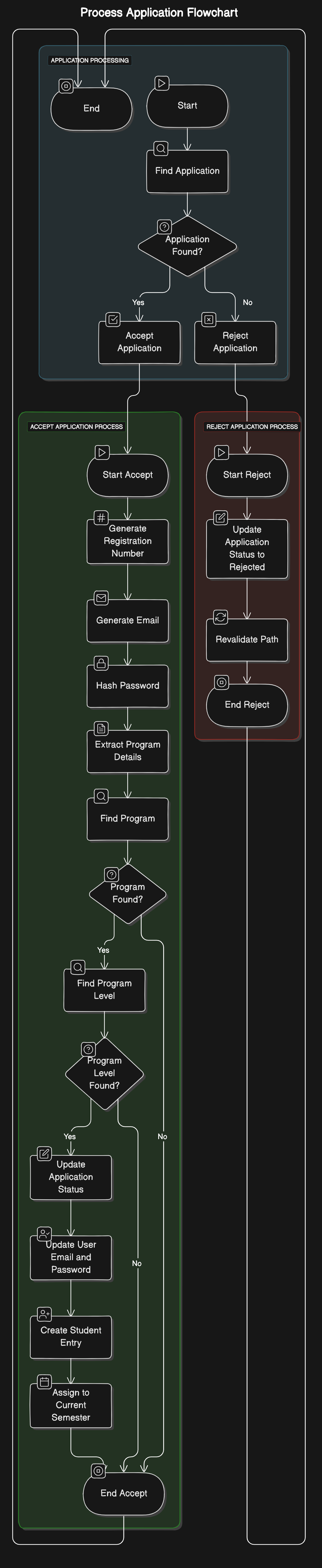
Application Process
  +-------------------+
  |       Start       |
  +-------------------+
         |
         v
  +-------------------+
  | Process Application|
  +-------------------+
         |
         v
  +-------------------+
  |   [Accept]        |
  +-------------------+
         |
         v
  +-------------------+
  | Accept Application |
  +-------------------+
         |
         v
  +-----------------------------+
  | Generate Registration Number |
  +-----------------------------+
         |
         v
  +-----------------------------+
  | Generate Student Email       |
  +-----------------------------+
         |
         v
  +-----------------------------+
  | Hash Password                |
  +-----------------------------+
         |
         v
  +-----------------------------+
  | Update Application Status    |
  +-----------------------------+
         |
         v
  +-----------------------------+
  | Update User Email and Password|
  +-----------------------------+
         |
         v
  +-----------------------------+
  | Create Student Entry         |
  +-----------------------------+
         |
         v
  +-----------------------------+
  | Assign to Current Semester   |
  +-----------------------------+
         |
         v
  +-------------------+
  |   [Reject]        |
  +-------------------+
         |
         v
  +-------------------+
  | Reject Application |
  +-------------------+
         |
         v
  +-----------------------------+
  | Update Application Status    |
  +-----------------------------+
         |
         v
  +-----------------------------+
  | Revalidate Path              |
  +-----------------------------+
         |
         v
  +-----------------------------+
  | Log Rejection                |
  +-----------------------------+
         |
         v
  +-------------------+
  | Initialize or     |
  | Check Semester    |
  +-------------------+
         |
         v
  +-------------------+
  | Get Current Semester |
  +-------------------+
         |
         v
  +-----------------------------+
  | [No Current Semester Found] |
  | Create New Semester         |
  +-----------------------------+
         |
         v
  +-----------------------------+
  | [Current Semester Exists]   |
  +-----------------------------+
         |
         v
  +-----------------------------+
  | [Semester Ended]            |
  | Create New Semester         |
  | Increment Student Levels    |
  +-----------------------------+
         |
         v
  +-----------------------------+
  | [Semester Active]           |
  | Log Active Semester         |
  +-----------------------------+
         |
         v
  +-------------------+
  | Get Student Balance|
  | for Semester       |
  +-------------------+
         |
         v
  +-------------------+
  | Get Financial     |
  | Statements        |
  +-------------------+
         |
         v
  +-------------------+
  | [No Statements]   |
  | Throw Error       |
  +-------------------+
         |
         v
  +-------------------+
  | Calculate Balance |
  | and Credit        |
  +-------------------+
         |
         v
  +-------------------+
  | Increment Student |
  | Levels and Semesters|
  +-------------------+
         |
         v
  +-----------------------------+
  | Get Student Balance and Credit|
  +-----------------------------+
         |
         v
  +-----------------------------+
  | Calculate Amount to Roll Over |
  +-----------------------------+
         |
         v
  +-----------------------------+
  | Calculate New Level          |
  +-----------------------------+
         |
         v
  +-----------------------------+
  | Update Student Level         |
  +-----------------------------+
         |
         v
  +-----------------------------+
  | Assign New Semester to Student|
  +-----------------------------+
         |
         v
  +-----------------------------+
  | Create Financial Statement   |
  | with Rolled Over Balance     |
  +-----------------------------+
         |
         v
  +-----------------------------+
  | Log Update                  |
  +-----------------------------+
         |
         v
  +-------------------+
  |        End        |
  +-------------------+
Flow Diagram Description
-
Process Application
- If the application is accepted, generate registration number, email, hash password, update statuses, create student entry, and assign the student to the current semester.
- If the application is rejected, update the application status and log the rejection.
-
Initialize or Check Semester
- Retrieve the current semester.
- If no current semester is found, create a new one.
- If the current semester exists but has ended, create a new semester and increment student levels and semesters.
- If the current semester is active, log it as active.
-
Get Student Balance for Semester
- Retrieve financial statements for the student for the specified semester.
- Calculate the balance and credit from the latest financial statement.
-
Increment Student Levels and Semesters
- Retrieve the student balance and credit for the old semester.
- Calculate the amount to roll over.
- Calculate the new level for the student.
- Update the student's level.
- Assign the new semester to the student.
- Create a financial statement for the new semester with the rolled-over balance.
- Log the update.