🎓 BriteEducation Management Systems (BEMS)
Overview
BriteEducation Management Systems (BEMS) is a comprehensive solution designed to streamline educational institution management. This all-in-one portal seamlessly integrates various functions to create a smooth user experience for students, teachers, and administrators alike.
🚀 Key Features
📊 Student Management
- Effortlessly manage student information
- Track academic progress
- Monitor attendance
- Handle invoicing and billing
- Manage student POPs from the bank
- Facilitate program changes and deferrals
- Manage student fees and other financial aspects
- Automated online class allocation for online students
📝 Application Tracking
- Simplify the application process
- Provide real-time updates for prospective students and parents
- Automated students records creation from the start
- Manage student applications and track their progress
- Generate reports for student applications
📚 Course Registration
- Enable students to register for courses based on program and semester
- Restrict registration to paid-up students only
- Allow administrators to set minimum fee payment threshold for registration (e.g., 50%)
- Provide automated course allocation based on student's program
- Offer easy, one-click registration for allocated courses
- Grant access to e-learning platform and online classes upon successful registration
💰 Financial Management
- Manage student fees with precision
- Handle invoicing and financial accounts effortlessly
-
Support multiple accounting methods:
- Accrual accounting
- Double-entry accounting
- Hybrid system
-
Direct billing and receipting for:
- Students
- External entities
- Staff members
-
Multi-institution account management:
- Cash Account
- Bank Account
- Asset Account
- And more
-
Flexible categorization of payments and transactions:
- Assets
- Expenses
- Equity
-
Auto-generation of financial reports:
- Income reports
- Balance sheets
- Cash flow statements
- Other key financial books
-
Asset management with depreciation tracking:
- Support for multiple standard depreciation methods
-
Easy generation of:
- Proforma invoices
- Custom invoices
- Streamlined refund process
- Support for expense entries
- Comprehensive full Accounting module
🛠️ Administrative Tools
-
Empower administrators with robust tools for:
- HR services
- Payroll management
- Overall school administration
- Audit logs
👨🏫 Teacher Portal
- Create and publish courses
- Manage class schedules
- Track student performance
👨🎓 Student Portal
-
Provide a comprehensive dashboard for:
- Viewing financial statements
- Course registration
- Accessing course materials and online platform
💡 Benefits
| Benefit | Description |
|---|---|
| Efficiency | Reduce administrative workload through automation and centralized data management |
| Transparency | Enhance clarity with real-time updates and easy information access |
| Accessibility | Ensure 24/7 portal access from anywhere with a user-friendly interface |
| Scalability | Adapt to your institution's growth with a flexible, scalable solution |
🚀 Getting Started
For assistance or support, please contact our helpdesk:
"Great companies are built on great products"
Go to Next Page
=============================
Students
Overview
The Students Module is designed to manage all aspects of student information, from personal details and academic progress to application tracking and financial statements. This module ensures a comprehensive and seamless experience for students, administrators, and faculty members by providing easy access to up-to-date information. Here's a comprehensive diagram for the student module, incorporating all the features mentioned:
                                                          +---------------------------------+
                                                          |             Start               |
                                                          +---------------------------------+
                                                                    |
                                                                    v
                                                          +---------------------------------+
                                                          |           User Logs In          |
                                                          +---------------------------------+
                                                                    |
                                                                    v
                                                          +---------------------------------+
                                                          |          Session Check          |
                                                          +---------------------------------+
                                                                  /      |       \
                                                                 /       |        \
                                                                /        |         \
                                                               v         |          v
                                            +---------------------------+|+---------------------------+
                                            |   Invalid Session         |||         Valid Session     |
                                            |   Show Error Message      |||      Fetch Student Data   |
                                            +---------------------------+|+---------------------------+
                                                        |               /  |            |
                                                        |              /   |            |
                                                        v             /    |            v
                                            +------------------------+     |    +-------------------------+
                                            |  Fetch Financial Data  |     |    |  Fetch User and Student  |
                                            |                        |     |    |       Information        |
                                            +------------------------+     |    +-------------------------+
                                                         |                 |                  |
                                                         v                 |                  v
                                            +----------------------------+ |    +--------------------------+
                                            |  Check Payment Status      | |    |  Fetch Available Courses |
                                            +----------------------------+ |    +--------------------------+
                                                  /          \              |                 |
                                                 /            \             |                 |
                                                v              v            |                 v
                         +---------------------+|+-------------------------+|+--------------------------------+
                         |  Payment < 50%      |||  Payment >= 50%         |||           User Data             |
                         | Show Payment Alert  ||| Display Courses         |||      Display Information        |
                         +---------------------+|+-------------------------+|+--------------------------------+
                                                |                          |                  |
                                                v                          |                  v
                         +---------------------------------+               |   +--------------------------------+
                         |      Financial Statements       |               |   |       Display Courses           |
                         | Display Financial Information   |               |   |         Course Selection         |
                         +---------------------------------+               |   +--------------------------------+
                                                |                          |                  |
                                                v                          |                  v
                         +--------------------------------+                |   +--------------------------------+
                         | Print Financial Statements     |                |   |    Register Courses            |
                         |     Print Button Click         |                |   +--------------------------------+
                         +--------------------------------+                |                  |
                                                                             \                /
                                                                              \              /
                                                                               v            v
                                                          +-------------------------------------------+
                                                          |             Registration Success           |
                                                          |         Show Success or Error Message      |
                                                          +-------------------------------------------+
Features
-
Personal Information Management:
- Store and retrieve student personal details, including name, surname, date of birth, gender, home address, contact information, national ID, and nationality.
-
Academic Information Management:
- Track and display student academic progress, including current program, registration number, current level, and current semester.
- Calculate and display remaining time to complete the program.
-
Application Management:
- Create, update, and retrieve student applications.
- Track application status and display related academic qualifications.
- Generate and manage unique application IDs for user tracking.
-
Financial Management:
- Retrieve and display student financial statements.
- Calculate and display balances, credits, and debits.
- Handle payment status checks to ensure students have paid the required fees for course registration.
-
Program Management:
- Retrieve and display available programs and their levels.
- Seed the database with predefined program data.
-
Error Handling and Data Validation:
- Ensure robust error handling across all processes.
- Validate input data to maintain data integrity and consistency.
Key Processes
Personal Information Management
-
Retrieve Student Information:
- Fetch personal details from the database based on the user ID.
- Display the information in a user-friendly format.
Academic Information Management
-
Track Academic Progress:
- Fetch academic details from the database, including current program and level.
- Calculate remaining time to complete the program.
- Display academic information in a structured manner.
Application Management
-
Create or Update Application:
- Validate application data.
- Check if the user already exists and update details if necessary.
- Create new applications or update existing ones.
- Handle related academic qualifications.
- Generate unique application IDs for tracking.
-
Retrieve Application by Short ID:
- Fetch application details based on a short application ID.
- Include associated user details and academic qualifications.
- Return application details or an error message if not found.
Financial Management
-
Retrieve Financial Statements:
- Fetch all financial statements for a student.
- Calculate and display balances, credits, and debits.
- Ensure students have paid required fees for course registration.
Key Sections and Processes
Session Management
- User Logs In: User logs into the system.
- Session Check: Checks if the user session is valid.
Financial Data Retrieval
- Fetch Financial Data: Retrieves the student's financial statements.
-
Check Payment Status: Checks if the student
has paid at least 50% of their semester fees.
- Payment < 50%: Shows a payment alert.
- Payment >= 50%: Displays available courses.
Displaying Information
- Fetch User and Student Information: Retrieves detailed user and student information, including personal and academic details.
- Display Information: Shows personal information, academic information, and application tracking.
Course Registration
- Fetch Available Courses: Retrieves courses available for registration.
- Course Selection: Allows students to select courses.
- Register Courses: Registers the student for the selected courses.
- Registration Success: Displays a success or error message based on the registration outcome.
Financial Statements
- Display Financial Statements: Shows financial transactions and balances.
- Print Financial Statements: Provides a print button to print the financial statements.
Error Handling
- Invalid Session: Shows an error message if the session is invalid.
- Session Errors: Handles errors related to session validation.
- Data Fetching Errors: Handles errors during data retrieval.
- Payment Verification Errors: Handles errors during payment status verification.
- Registration Errors: Handles errors during course registration.
Loading State
- Loading Indicators: Displays loading indicators while fetching data to enhance user experience.
"Great companies are built on great products"
Application Process
Overview
This document outlines the processes for managing applications and programs within the system. It details the functions for retrieving and creating applications, as well as managing program data.
Features
- Retrieve Application by Short ID: Fetches a single application by its short application ID along with associated user details and academic qualifications.
- Create or Update Application: Handles the creation of a new application or updates an existing one, including user details and academic qualifications.
- Retrieve Program Names: Fetches the names of all available programs from the database.
- Seed Programs: Populates the database with predefined program data.
Flow Diagram
  +---------------------------------------------------------+
  |                         Start                           |
  +---------------------------------------------------------+
             |                       |                      |
             |                       |                      |
             |                       |                      |
+---------------------------+  +-----------------+  +-----------------+
| Retrieve Application by    |  | Retrieve Program|  |  Seed Programs  |
| Short ID                   |  |  Names          |  |                 |
+---------------------------+  +-----------------+  +-----------------+
             |                       |                      |
             |                       |                      |
             v                       v                      |
+---------------------------+  +-----------------+         |
| Fetch Application Details |  | Fetch Programs  |         |
+---------------------------+  |  from Database  |         |
             |                       |                      |
             |                       |                      |
  +----------------+      +-----------------+              |
  | Application    |      | Return Program  |              |
  | Found          |      |  Names          |              |
  +----------------+      +-----------------+              |
             |                                            v
             |                                            +---------------------+
             v                                            |  Define Programs    |
  +--------------------+                                 |   and Levels        |
  | Return Application |                                 +---------------------+
  | Details            |                                            |
  +--------------------+                                            |
             |                                            +--------------------+
             |                                            | Delete Existing    |
             v                                            | Program Data       |
  +--------------------+                                 +--------------------+
  | Application Not    |                                            |
  | Found              |                                            |
  +--------------------+                                            v
             |                                            +---------------------+
             v                                            | Insert New Program  |
  +--------------------+                                 | Data                |
  | Return Error Msg   |                                 +---------------------+
  +--------------------+                                            |
             |                                            +---------------------+
             v                                            | Return Success or   |
+--------------------------+                             | Error Message       |
| Create or Update Application|                           +---------------------+
+--------------------------+
             |
             |
             v
+-------------------------+
| Validate Application    |
| Data                    |
+-------------------------+
             |
             v
+--------------------------+
| Check if User Exists     |
+--------------------------+
             |
   +--------------------+
   | User Exists        |
   | Update User Details|
   +--------------------+
             |
   +------------------------+
   | Check if Application    |
   | Exists                 |
   +------------------------+
             |
   +--------------------+      +------------------+
   | Application Exists |      | No Application   |
   | Update Application |      | Create New App   |
   +--------------------+      +------------------+
             |
   +--------------------------+
   | Update Academic           |
   | Qualifications            |
   +--------------------------+
             |
             v
+--------------------------+
| Return Success or         |
| Error Message             |
+--------------------------+
Detailed Breakdown
Retrieve Application by Short ID
Process
-
Fetch Application Details: The system fetches
an application from the database using the provided short
application ID.
- Includes associated user details and academic qualifications.
- If the application is found, the details are returned.
- If the application is not found, an error message is returned.
Key Steps
- Query the database for the application by its short ID.
- Include nested relations with the user and academic qualifications.
- Handle potential errors and return appropriate messages.
Create or Update Application
Process
-
Validate Application Data: The system validates the data provided in the application form.
- Checks if the user already exists based on the email address.
- If the user exists, updates the user details.
-
Checks if an application already exists for the user.
- If an application exists, updates the application and academic qualifications.
- If no application exists, creates a new application and academic qualifications.
- If the user does not exist, creates a new user and application.
-
Return Success or Error Message: After processing, the system returns a success message with the application ID or an error message if any issues occurred.
Key Steps
- Validate input data using predefined schemas.
- Use database operations to check for existing users and applications.
- Create or update user and application records.
- Handle potential errors and ensure data consistency.
Retrieve Program Names
Process
-
Fetch Programs from Database: The system retrieves all program records from the database.
- Includes program levels and durations.
- Returns the names of the programs in a formatted list.
-
Return Program Names or Error Message: If successful, returns the list of program names. If an error occurs, returns an error message.
Key Steps
- Query the database for program records.
- Map the program names and levels into a list.
- Handle potential errors and return appropriate messages.
Seed Programs
Process
-
Define Programs and Levels: The system defines a set of programs and their respective levels and durations.
- Deletes existing program and level data from the database.
- Inserts the predefined program data into the database.
- Returns a success message upon completion.
-
Return Success or Error Message: After processing, the system returns a success message or an error message if any issues occurred.
Key Steps
- Define a list of programs and their levels.
- Use database operations to clear existing data.
- Insert new program data into the database.
- Handle potential errors and ensure data consistency.
Relational Diagram
+----------------+                +----------------+
|      USER      |                |    STUDENT     |
|----------------|                |----------------|
| id             |  |----------|  | id             |
| name           |--|          |--| userId         |
| surname        |  |          |  | registrationNo |
| email          |  |          |  | currentProgram |
| dateOfBirth    |  |          |  | currentLevel   |
| nationalID     |  |          |  +----------------+
| nationality    |  |          |
| gender         |  |          |         +----------------+
| cellNumber     |  |          |         |    PROGRAM      |
| homeAddress    |  |          |         |----------------|
| studentemail   |  |          |---------| id             |
+----------------+                | programName    |
                                   +----------------+
       |                              |     |
       | "has"                        |     | "has"
       |                              |     |
       |                +----------------+  |
       |                | PROGRAM_LEVEL  |  |
       |                |----------------|  |
       |                | id             |  |
       |                | programId      |--|
       |                | level          |
       |                | duration       |
       |                +----------------+


+-------------------+        +-------------------+
|   APPLICATION     |        | ACADEMIC_QUALIF.  |
|-------------------|        |-------------------|
| id                |--|     | id                |
| userId            |  |-----| applicationId     |
| applicationId     |        | examBody          |
| shortAppId        |        | level             |
| status            |        | subject           |
| nameOfProgram     |        | grade             |
| classPreference   |        +-------------------+
+-------------------+
       |
       | "has"
       |
       |
+-------------------+
|  STATUS_HISTORY   |
|-------------------|
| id                |
| applicationId     |
| status            |
| date              |
+-------------------+
Student Dashboard
Overview
The Student Information Retrieval feature allows the system to fetch and display detailed personal and academic information about a student. This feature ensures that the students and administrators can access up-to-date and accurate information about the student's profile, academic progress, and application status.
Features
- Session Management: Ensures the user is logged in and has a valid session.
- Personal Information Retrieval: Fetches and displays the student's personal information.
- Academic Information Retrieval: Displays the student's academic details including current level, program, and remaining time to complete the program.
- Application Tracking: Allows students to track their application status.
- Loading and Error Handling: Provides loading indicators and error messages for better user experience.
Flow Diagram
  +-----------------+
  |      Start      |
  +-----------------+
         |
         v
  +---------------------+
  | Validate Session     |
  +---------------------+
         |
         |
   +----------------------+
   | [Session Invalid]     |
   | Show Error Message    |
   +----------------------+
         |
         |
   +----------------------+
   | [Session Valid]       |
   | Fetch User and        |
   | Student Information   |
   +----------------------+
         |
         |
   +----------------------+
   | [Fetch Successful]    |
   | Display Information   |
   +----------------------+
         |
         |
   +----------------------+
   | Display Personal Info |
   +----------------------+
         |
         |
   +----------------------+
   | Display Academic Info |
   +----------------------+
         |
         |
   +-------------------------+
   | Display App Tracking     |
   +-------------------------+
         |
         |
   +----------------------+
   | [Fetch Failed]        |
   | Show Error Message    |
   +----------------------+
         |
         v
   +-----------------+
   |      End        |
   +-----------------+
Architecture
Frontend
- React: Used for building the user interface.
- Next.js: Server-side rendering and API routes.
- Tailwind CSS: Styling framework.
-
Component Libraries: Custom components like
Card,Avatar,Button,Label, andFooterTextare used for consistent UI design.
Backend
- Prisma: ORM for database interactions.
- PostgreSQL: Database to store user, student, and application data.
Technical Implementation
Session Management
- User Authentication: The system checks if the user is logged in and has a valid session.
- Session Retrieval: If the session is valid, the system retrieves user information, including the user ID.
Fetching User and Student Information
- User Information Retrieval: The system retrieves user details, including name, surname, date of birth, gender, address, phone number, personal email, and school email.
- Student Information Retrieval: The system fetches additional student-specific details such as the registration number, program, current level, and current semester.
- Application Data: The system retrieves application data, including academic qualifications and application status.
Displaying Information
- Personal Information: Displays basic personal details of the student like name, surname, date of birth, gender, home address, phone number, personal email, school email, national ID, and nationality.
- Academic Information: Shows the student's program details, current level, registration number, current semester, and remaining time to complete the program.
- Application Tracking: Displays the list of applications with their respective statuses and IDs.
Error Handling
- Invalid User ID: If the user ID is invalid, an error message is displayed.
- No User Data: If no user data is found, a message indicating the absence of user data is shown.
- Internal Server Error: In case of any server errors, an appropriate error message is displayed.
Loading State
- Loading Indicator: A loading skeleton or spinner is shown while the data is being fetched from the server to enhance user experience.
Algorithms and Key Processes
Calculate Remaining Time
- Input: Current level and total duration of the program.
- Process: Parses the total duration to extract the number of years and converts months to years. Then, it calculates the remaining years and semesters based on the current level.
- Output: Returns the formatted string indicating the remaining time.
Fetching Data
- Database Queries: Uses Prisma to query the database for user and student information.
- Data Aggregation: Aggregates data from various related tables to compile comprehensive user and student information.
- Data Formatting: Formats dates and other data fields to be user-friendly.
Relational Diagram
+----------------+                +----------------+
|      USER      |                |    STUDENT     |
|----------------|                |----------------|
| id             |  |----------|  | id             |
| name           |--|          |--| userId         |
| surname        |  |          |  | currentProgram |
| dateOfBirth    |  |          |  | registrationNo |
| gender         |  |          |  | currentLevel   |
| homeAddress    |  |          |  | studentEmail   |
| cellNumber     |  |          |  | nationalID     |
| email          |  |          |  | nationality    |
+----------------+  |          |  +----------------+
                    |          |
                    |          |          +----------------------+
                    |          |          |   PROGRAM_LEVEL      |
                    |          |----------|----------------------|
                    |                     | id                   |
                    |                     | programName          |
                    |                     | duration             |
                    |                     | feesPerSemester      |
                    |                     +----------------------+
                    |
                    |
                    |
                    |                    +----------------------+
                    |                    |    SEMESTER           |
                    |                    |-----------------------|
                    |------------------->| id                    |
                                         | semesterName          |
                                         | isCurrent             |
                                         +-----------------------+
                                                 |
                                                 |
                                                 |
+-------------------+                            |
|   APPLICATION     |<---------------------------|
|-------------------|                            |
| id                |                            |
| studentId         |                            |
| shortAppId        |                            |
| status            |                            |
+-------------------+                            |
         |                                       |
         | "includes"                            |
         |                                       |
         |                                       |
+---------------------------+                   |
| ACADEMIC_QUALIFICATION     |<------------------+
|----------------------------|
| id                         |
| applicationId              |
| level                      |
| subject                    |
| grade                      |
+----------------------------+
Detailed Breakdown of Personal Information Retrieval
Validate Session
-
Check Session: The system verifies if the
user's session is valid.
- If invalid, an error message is displayed, and the process stops.
- If valid, the system proceeds to fetch user and student information.
Fetch User and Student Information
-
User Details: The system retrieves:
- Name: The student's first name.
- Surname: The student's last name.
- Date of Birth: The student's birth date.
- Gender: The student's gender.
- Home Address: The student's residential address.
- Cell Number: The student's contact number.
- Email: The student's personal email address.
- School Email: The student's institutional email address.
- National ID: The student's national identification number.
- Nationality: The student's nationality.
-
Student Details: The system retrieves:
- Registration Number: The unique number assigned to the student upon registration.
- Program: The name of the academic program the student is enrolled in.
- Current Level: The current academic level or year of the student.
- Current Semester: The current semester name.
- Academic Qualifications: A list of qualifications related to the student's applications, including the level, subject, and grade.
Display Information
-
Personal Information Section:
- Displays the retrieved user details in a user-friendly format.
- Uses a combination of text, labels, and sections to organize the information.
-
Academic Information Section:
- Displays the retrieved student details.
- Includes the program, current level, registration number, current semester, and the remaining time to complete the program.
-
Application Tracking Section:
- Lists all applications related to the student.
- Provides links for tracking the status of each application.
Error Handling and Loading State
-
Error Handling:
- If any error occurs during data retrieval, an error message is displayed.
- Common errors include invalid user ID, no user data found, or internal server errors.
-
Loading State:
- While data is being fetched, a loading indicator (such as a spinner or skeleton loader) is displayed to the user.
- This enhances the user experience by indicating that the system is working on fetching the required data.
Personal Information
Overview
The Student Information Retrieval feature allows the system to fetch and display detailed personal and academic information about a student. This feature ensures that the students and administrators can access up-to-date and accurate information about the student's profile, academic progress, and application status.
Features
- Session Management: Ensures the user is logged in and has a valid session.
- Personal Information Retrieval: Fetches and displays the student's personal information.
- Academic Information Retrieval: Displays the student's academic details including current level, program, and remaining time to complete the program.
- Application Tracking: Allows students to track their application status.
- Loading and Error Handling: Provides loading indicators and error messages for better user experience.
Flow Diagram
Start
 |
 |--> Validate Session
       |
       |--> [Session Invalid] -> Show Error Message
       |
       |--> [Session Valid] -> Fetch User and Student Information
             |
             |--> [Fetch Successful] -> Display Information
             |       |
             |       |--> Display Personal Information
             |       |--> Display Academic Information
             |       |--> Display Application Tracking
             |
             |--> [Fetch Failed] -> Show Error Message
End
Architecture
Frontend
- React: Used for building the user interface.
- Next.js: Server-side rendering and API routes.
- Tailwind CSS: Styling framework.
-
Component Libraries: Custom components like
Card,Avatar,Button,Label, andFooterTextare used for consistent UI design.
Backend
- Prisma: ORM for database interactions.
- PostgreSQL: Database to store user, student, and application data.
Technical Implementation
Session Management
- User Authentication: The system checks if the user is logged in and has a valid session.
- Session Retrieval: If the session is valid, the system retrieves user information, including the user ID.
Fetching User and Student Information
- User Information Retrieval: The system retrieves user details, including name, surname, date of birth, gender, address, phone number, personal email, and school email.
- Student Information Retrieval: The system fetches additional student-specific details such as the registration number, program, current level, and current semester.
- Application Data: The system retrieves application data, including academic qualifications and application status.
Displaying Information
- Personal Information: Displays basic personal details of the student like name, surname, date of birth, gender, home address, phone number, personal email, school email, national ID, and nationality.
- Academic Information: Shows the student's program details, current level, registration number, current semester, and remaining time to complete the program.
- Application Tracking: Displays the list of applications with their respective statuses and IDs.
Error Handling
- Invalid User ID: If the user ID is invalid, an error message is displayed.
- No User Data: If no user data is found, a message indicating the absence of user data is shown.
- Internal Server Error: In case of any server errors, an appropriate error message is displayed.
Loading State
- Loading Indicator: A loading skeleton or spinner is shown while the data is being fetched from the server to enhance user experience.
Algorithms and Key Processes
Calculate Remaining Time
- Input: Current level and total duration of the program.
- Process: Parses the total duration to extract the number of years and converts months to years. Then, it calculates the remaining years and semesters based on the current level.
- Output: Returns the formatted string indicating the remaining time.
Fetching Data
- Database Queries: Uses Prisma to query the database for user and student information.
- Data Aggregation: Aggregates data from various related tables to compile comprehensive user and student information.
- Data Formatting: Formats dates and other data fields to be user-friendly.
Entity-Relationship Diagram
+-------------+     +---------------+     +------------------+
|    USER     |     |    STUDENT    |     |   PROGRAM_LEVEL  |
+-------------+     +---------------+     +------------------+
| id          |1   1| id            |     | id               |
| name        |-----| userId        |*   1| programName      |
| surname     |     | currentProgram|-----| duration         |
| dateOfBirth |     | LevelId       |     | feesPerSemester  |
| gender      |     | registration  |     +------------------+
| homeAddress |     | Number        |
| cellNumber  |     | currentLevel  |
| email       |     | studentEmail  |
+-------------+     | nationalID    |
                    | nationality   |
                    +---------------+
                          | 1
                          |
                          | *
                    +---------------+     +---------------+
                    |   SEMESTER    |     |  APPLICATION  |
                    +---------------+     +---------------+
                    | id            |1   *| id            |
                    | semesterName  |-----| studentId     |
                    | isCurrent     |     | shortApplica  |
                    +---------------+     | tionId        |
                                          | status        |
                                          +---------------+
                                                | 1
                                                |
                                                | *
                                    +------------------------+
                                    | ACADEMIC_QUALIFICATION |
                                    +------------------------+
                                    | id                     |
                                    | applicationId          |
                                    | level                  |
                                    | subject                |
                                    | grade                  |
                                    +------------------------+

Legend:
1 = One
* = Many
- = Relationship line
## Detailed Breakdown of Personal Information Retrieval
Validate Session
-
Check Session: The system verifies if the
user's session is valid.
- If invalid, an error message is displayed, and the process stops.
- If valid, the system proceeds to fetch user and student information.
Fetch User and Student Information
-
User Details: The system retrieves:
- Name: The student's first name.
- Surname: The student's last name.
- Date of Birth: The student's birth date.
- Gender: The student's gender.
- Home Address: The student's residential address.
- Cell Number: The student's contact number.
- Email: The student's personal email address.
- School Email: The student's institutional email address.
- National ID: The student's national identification number.
- Nationality: The student's nationality.
-
Student Details: The system retrieves:
- Registration Number: The unique number assigned to the student upon registration.
- Program: The name of the academic program the student is enrolled in.
- Current Level: The current academic level or year of the student.
- Current Semester: The current semester name.
- Academic Qualifications: A list of qualifications related to the student's applications, including the level, subject, and grade.
Display Information
-
Personal Information Section:
- Displays the retrieved user details in a user-friendly format.
- Uses a combination of text, labels, and sections to organize the information.
-
Academic Information Section:
- Displays the retrieved student details.
- Includes the program, current level, registration number, current semester, and the remaining time to complete the program.
-
Application Tracking Section:
- Lists all applications related to the student.
- Provides links for tracking the status of each application.
Error Handling and Loading State
-
Error Handling:
- If any error occurs during data retrieval, an error message is displayed.
- Common errors include invalid user ID, no user data found, or internal server errors.
-
Loading State:
- While data is being fetched, a loading indicator (such as a spinner or skeleton loader) is displayed to the user.
- This enhances the user experience by indicating that the system is working on fetching the required data.
Financial Statements
Overview
The Financial Statements feature allows students to view detailed transactions and balances for their accounts. It ensures that students can access their financial information, including debits, credits, and outstanding balances for the current semester.
Features
- Session Management: Ensures that the user is logged in and has a valid session.
- Financial Data Retrieval: Fetches all financial statements for the student.
- Error Handling: Provides user-friendly error messages in case of issues.
- Print Capability: Allows users to print their financial statements.
Flow Diagram
+-------------------+
|   User Logs In    |
+-------------------+
          |
          v
+-------------------+
|   Session Check   |
+-------------------+
          |
    +-----+-----+
    |           |
    v           v
+--------+  +-----------------+
| Valid  |  | Invalid Session |
+--------+  +-----------------+
    |               |
    |               v
    |       +-----------------+
    |       | Show Error      |
    |       | Message         |
    |       +-----------------+
    |
    v
+------------------------+
| Fetch Financial        |
| Statements             |
+------------------------+
    |
    +------------+
    |            |
    v            v
+--------+  +-----------------+
| Success |  | Error          |
+--------+  +-----------------+
    |               |
    |               v
    |       +-----------------+
    |       | Show Error      |
    |       | Message         |
    |       +-----------------+
    v
+------------------------+
| Display Financial      |
| Statements             |
+------------------------+
    |
    v
+------------------------+
| Print Financial        |
| Statements             |
+------------------------+
Architecture
Frontend
- React: Used for building the user interface.
- Next.js: Server-side rendering and API routes.
- Tailwind CSS: Styling framework.
- React-to-print: Library for printing components.
- Lucide-react: Icon library for UI elements.
Backend
- Prisma: ORM for database interactions.
- PostgreSQL: Database to store user, financial statement, and student data.
Technical Implementation
Session Management
- User Authentication: The system checks if the user is logged in and has a valid session.
- Session Retrieval: If the session is valid, the system retrieves user information, including user ID.
Fetch Financial Data
- Fetch Financial Statements: The system retrieves the student's financial statements from the database based on the user ID.
- Order by Date: The financial statements are ordered by date in descending order to show the latest transactions first.
- Format Data: The financial data is formatted to include proper debit, credit, and balance values.
Error Handling
- Invalid User ID: If the user ID is invalid, an error message is displayed.
- No Financial Data: If no financial data is found, a message indicating the outstanding balance is shown.
- Internal Server Error: In case of any server errors, an appropriate error message is displayed.
Print Capability
- Print Button: A print button is provided for users to print their financial statements.
- React-to-print: The library is used to handle the printing of the financial statement component.
Component Breakdown
Page Component
-
Session Check: The component first checks if
the user has a valid session by calling
getSession. -
Fetch Financial Statements: If the session is
valid, it fetches the financial statements for the student
using
getAllFinancialStatementsByStudentId. - Render Financial Statements: The financial statements are passed to a child component for display. If there's an error, an appropriate message is shown.
Financial Statements Retrieval
- Validate User ID: Checks if the user ID is valid. If not, returns an error.
- Fetch Student Data: Retrieves student data, including current program level and semester registrations.
- Fetch Financial Statements: Retrieves financial statements from the database, ordered by date.
- Format Financial Data: Converts financial amounts from milli-units to standard units for readability.
- Calculate Totals: Computes the total debit, total credit, and the latest balance.
- Return Financial Data: Returns the formatted financial data along with totals or an error message if applicable.
Financial Statements Component
- Display Financial Data: Renders the financial statements in a table format, showing date, debit, credit, and balance for each transaction.
-
Print Functionality: Provides a print button
that uses
react-to-printto print the financial statements.
Algorithms and Key Processes
Fetching Financial Statements
- Session Check: The session is validated to ensure the user is logged in.
- Database Query: The system queries the database to fetch financial statements for the student.
- Data Formatting: The financial data is formatted to ensure debits, credits, and balances are in a readable format.
- Error Handling: If no financial statements are found, a custom error message is generated to inform the student of their outstanding balance.
Printing Financial Statements
- Print Button: A button is provided on the UI to trigger the print functionality.
-
React-to-print Integration: The
react-to-printlibrary is used to capture the component and print it as a document. - Document Title: The printed document is titled "Financial Statement" for clarity.
Relational Diagram
+----------+     +-----------+     +---------------+
|   USER   |     |  STUDENT  |     | PROGRAM_LEVEL |
+----------+     +-----------+     +---------------+
| id       |1   1| id        |     | id            |
| name     |-----| userId    |*   1| programName   |
| email    |     | currentPro|-----| feesPerSemes  |
+----------+     | gramLevel |     | ter           |
                 | Id        |     +---------------+
                 +-----------+
                      | 1
                      |
                      | *
    +----------+    +----------------------+
    | SEMESTER |    | SEMESTER_REGISTRATION|
    +----------+    +----------------------+
    | id       |1  *| id                   |
    | isCurrent|----| studentId            |
    +----------+    | semesterId           |
         |          +----------------------+
         |                    | *
         | *                  |
         |                    | 1
+----------------------+      |
| FINANCIAL_STATEMENT  |      |
+----------------------+      |
| id                   |      |
| studentId            |------+
| semesterId           |
| date                 |
| debit                |
| credit               |
| balance              |
+----------------------+

Legend:
1 = One
* = Many
- = Relationship line
Course Registrations
The course registration feature enables students to register for courses for the current semester. The feature ensures students have paid at least 50% of their semester fees before allowing them to register for courses. The system displays available courses for the student's program and facilitates a seamless registration process.
Features
- Session Management: Ensures the user is logged in and has a valid session.
- Payment Verification: Checks if the student has paid at least 50% of their semester fees.
- Course Display: Shows available courses for the student's program.
- Course Registration: Allows students to register for courses if they meet the payment criteria.
- Loading State: Displays a loading indicator during the registration process.
- Error Handling: Provides user-friendly error messages in case of issues.
Flow Diagram
+-------------------+
|   User Logs In    |
+-------------------+
          |
          v
+-------------------+
|   Session Check   |
+-------------------+
          |
    +-----+-----+
    |           |
    v           v
+--------+  +-----------------+
| Valid  |  | Invalid Session |
+--------+  +-----------------+
    |               |
    |               v
    |       +-----------------+
    |       | Show Error      |
    |       | Message         |
    |       +-----------------+
    v
+------------------------+
| Fetch Student Data     |
+------------------------+
          |
          v
+------------------------+
| Fetch Available Courses|
+------------------------+
          |
          v
+------------------------+
| Check Payment Status   |
+------------------------+
          |
    +-----+-----+
    |           |
    v           v
+--------+  +-----------------+
|Payment |  | Payment < 50%   |
|>= 50%  |  +-----------------+
+--------+          |
    |               v
    |       +-----------------+
    |       | Show Payment    |
    |       | Alert           |
    |       +-----------------+
    v
+------------------------+
| Display Courses        |
+------------------------+
          |
          v
+------------------------+
| Course Selection       |
+------------------------+
          |
          v
+------------------------+
| Register Courses       |
+------------------------+
          |
    +-----+-----+
    |           |
    v           v
+--------+  +-----------------+
|Success |  | Registration    |
+--------+  | Fails           |
    |       +-----------------+
    |               |
    |               v
    |       +-----------------+
    |       | Show Registra-  |
    |       | tion Error      |
    |       +-----------------+
    v
+------------------------+
| Show Registration      |
| Success                |
+------------------------+
Architecture
Frontend
- React: Used for building the user interface.
- Next.js: Server-side rendering and API routes.
- Tailwind CSS: Styling framework.
- React Loader Spinner: Loading indicators.
- Sonner: Toast notifications for user feedback.
Backend
- Prisma: ORM for database interactions.
- PostgreSQL: Database to store user, course, and registration data.
Technical Implementation
Session Management
- User Authentication: The system checks if the user is logged in and has a valid session.
- Session Retrieval: If the session is valid, the system retrieves user information including user ID.
Fetch Student Data
- Fetch Student Information: The system fetches the student's data including their program and current semester.
- Fetch Available Courses: Based on the student's program, the system retrieves the available courses for the current semester.
Payment Verification
- Check Payment Status: The system checks if the student has paid at least 50% of their semester fees.
- Display Payment Alert: If the student has not paid enough, an alert is shown indicating the need to pay 50% of the fees.
Course Display
- Display Courses: If the student has paid enough, the system displays the available courses for the current semester.
- Course Selection: The student can select the courses they want to register for.
Course Registration
- Register Courses: Once the student selects the courses, the system registers the student for the selected courses.
- Loading Indicator: A loading indicator is shown during the registration process.
- Registration Success/Failure: Upon successful registration, a success message is shown. If registration fails, an error message is displayed.
Error Handling
- Session Errors: If the session is invalid, an error message is shown, prompting the user to log in again.
- Data Fetching Errors: If there are issues fetching student data or available courses, appropriate error messages are displayed.
- Payment Verification Errors: If there are issues verifying payment status, an error message is shown.
- Registration Errors: If course registration fails, an error message is displayed with the failure reason.
Course Registration
Overview
The Course Registrations feature enables students to register for courses for the current semester, ensuring they have paid at least 50% of their semester fees before allowing them to register. The system handles session management, payment verification, course display, and registration, providing a seamless and user-friendly experience.
                               +-------------------+
                               |   User Logs In    |
                               +-------------------+
                                       |
                                       v
                           +----------------------+
                           |     Session Check    |
                           +----------------------+
                           /           |          \
                          /            |           \
                         v             v            v
          +----------------------+     |    +----------------------+
          |     Invalid Session  |     |    |    Valid Session     |
          | Show Error Message   |     |    |  Fetch Student Data  |
          +----------------------+     |    +----------------------+
                                       |                  |
                                       |                  v
                                       |    +--------------------------+
                                       |    | Fetch Available Courses  |
                                       |    +--------------------------+
                                       |                  |
                                       |                  v
                                       |    +--------------------------+
                                       |    |  Check Payment Status    |
                                       |    +--------------------------+
                                       |            /       \
                                       |           /         \
                                       v          /           v
 +----------------------+  +----------------------+  +----------------------+
 |   Payment < 50%      |  |   Payment >= 50%     |  |  Payment Verification |
 | Show Payment Alert   |  |  Display Courses     |  |        Errors         |
 +----------------------+  +----------------------|  | Show Error Message   |
                      \    |                      |  +----------------------+
                       \   |                      |
                        v  v                      |
              +-------------------------+         |
              |   Course Selection      |         |
              +-------------------------+         |
                       |                         /
                       v                        /
              +-------------------------+       /
              |   Register Courses      |      /
              +-------------------------+     /
                       |                    /
                       v                   /
    +---------------------------+         /
    |   Registration Success    |        /
    | Show Success Message      |       /
    +---------------------------+      /
                                    /
                                  v
            +---------------------------+
            |   Registration Fails      |
            | Show Registration Error   |
            +---------------------------+
Registry
The registry module is designed to manage student enrollments and applications efficiently. It includes functionalities for:
- Session Management: Ensures the user is logged in and manages sessions effectively.
- Financial Data Retrieval: Fetches and displays financial statements, balance, and invoice data for students.
- Enrollment and Application Statistics: Provides stats on total enrollments, pending, approved, and rejected applications with percentage changes.
- Application Processing: Handles acceptance and rejection of applications, including generating registration numbers and emails, updating statuses, and logging rejections.
- Student and Program Management: Retrieves and displays data on students, programs, and levels, assigns students to current semesters, and increments student levels.
- Recent Activities: Fetches and displays recent activities for administrative tracking.
The module ensures seamless handling of various student-related processes, providing a comprehensive administrative tool for managing enrollments, financials, and applications.
+--------------------+              +--------------------+
|  User Logs In      |              |  Admin Dashboard   |
+--------------------+              +--------------------+
         |                                  |
         v                                  v
+-----------------------+        +--------------------------+
| Session Check         |        | View Enrollment Stats    |
+-----------------------+        +--------------------------+
     |         |                           |
     |         v                           v
     |    +------------------+    +------------------------------+
     |    | Invalid Session  |    | View Application Stats       |
     |    | Show Error       |    +------------------------------+
     |    +------------------+    | View Pending Applications    |
     v                           |------------------------------|
+-----------------------+        | View Approved Applications   |
| Fetch User Info       |        |------------------------------|
+-----------------------+        | View Rejected Applications   |
     |                          +------------------------------+
     v                                  |
+-------------------------------+       |
| Fetch Financial Statements    |       v
+-------------------------------+   +-----------------------------+
     |                          |   | Process Application         |
     v                          |   +-----------------------------+
+-------------------------------+   |  +-------------+ +-------------+
| Display Financial Statements  |   |  |  Accept     | |  Reject     |
+-------------------------------+   |  +-------------+ +-------------+
     |                          |   |        |                |
     v                          |   |        v                v
+-------------------------------+   |  +-------------------+ +--------------------+
| Print Financial Statements    |   |  | Generate Reg. No. | | Update Application |
+-------------------------------+   |  +-------------------+ +--------------------+
     |                          |   |        |                      |
     v                          |   |        v                      v
+-------------------------------+   |  +-------------------+ +--------------------+
| Get Student Balance           |   |  | Generate Email    | | Log Rejection      |
+-------------------------------+   |  +-------------------+ +--------------------+
     |                          |   |        |                      |
     v                          |   |        v                      v
+-------------------------------+   |  +-----------------------------+
| Get Student Invoice Data      |   | | Assign to Semester          |
+-------------------------------+   | |------------------------------|
     |                          |   |        |
     v                          |   |        v
+-------------------------------+   | +-----------------------------+
| Generate Financial Statements |   | | Increment Levels & Semesters|
+-------------------------------+   | +-----------------------------+
     |                          |   |
     v                          |   v
+-------------------------------+ +-----------------------------+
| Calculate Change Percentage   | | Get Recent Activities       |
+-------------------------------+ +-----------------------------+
     |                          |         |
     v                          |         v
+-------------------------------+ +-----------------------------+
| Retrieve Application Status   | | Get All Programs and Levels |
+-------------------------------+ +-----------------------------+
     |                          |         |
     v                          |         v
+-------------------------------+ +-----------------------------+
| Generate Registration Number  | | Get All Applications        |
+-------------------------------+ +-----------------------------+
     |                          |         |
     v                          |         v
+-------------------------------+ +-----------------------------+
| Generate Student Email        | | Get All Students            |
+-------------------------------+ +-----------------------------+
     |                          |
     v                          |
+-------------------------------+
| Get User ID by Student ID     |
+-------------------------------+
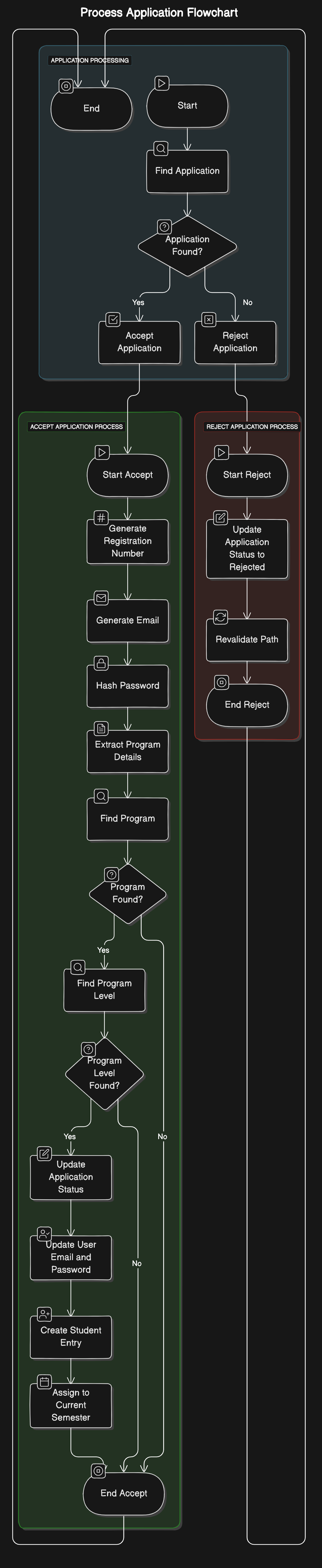
Application Process
  +-------------------+
  |       Start       |
  +-------------------+
         |
         v
  +-------------------+
  | Process Application|
  +-------------------+
         |
         v
  +-------------------+
  |   [Accept]        |
  +-------------------+
         |
         v
  +-------------------+
  | Accept Application |
  +-------------------+
         |
         v
  +-----------------------------+
  | Generate Registration Number |
  +-----------------------------+
         |
         v
  +-----------------------------+
  | Generate Student Email       |
  +-----------------------------+
         |
         v
  +-----------------------------+
  | Hash Password                |
  +-----------------------------+
         |
         v
  +-----------------------------+
  | Update Application Status    |
  +-----------------------------+
         |
         v
  +-----------------------------+
  | Update User Email and Password|
  +-----------------------------+
         |
         v
  +-----------------------------+
  | Create Student Entry         |
  +-----------------------------+
         |
         v
  +-----------------------------+
  | Assign to Current Semester   |
  +-----------------------------+
         |
         v
  +-------------------+
  |   [Reject]        |
  +-------------------+
         |
         v
  +-------------------+
  | Reject Application |
  +-------------------+
         |
         v
  +-----------------------------+
  | Update Application Status    |
  +-----------------------------+
         |
         v
  +-----------------------------+
  | Revalidate Path              |
  +-----------------------------+
         |
         v
  +-----------------------------+
  | Log Rejection                |
  +-----------------------------+
         |
         v
  +-------------------+
  | Initialize or     |
  | Check Semester    |
  +-------------------+
         |
         v
  +-------------------+
  | Get Current Semester |
  +-------------------+
         |
         v
  +-----------------------------+
  | [No Current Semester Found] |
  | Create New Semester         |
  +-----------------------------+
         |
         v
  +-----------------------------+
  | [Current Semester Exists]   |
  +-----------------------------+
         |
         v
  +-----------------------------+
  | [Semester Ended]            |
  | Create New Semester         |
  | Increment Student Levels    |
  +-----------------------------+
         |
         v
  +-----------------------------+
  | [Semester Active]           |
  | Log Active Semester         |
  +-----------------------------+
         |
         v
  +-------------------+
  | Get Student Balance|
  | for Semester       |
  +-------------------+
         |
         v
  +-------------------+
  | Get Financial     |
  | Statements        |
  +-------------------+
         |
         v
  +-------------------+
  | [No Statements]   |
  | Throw Error       |
  +-------------------+
         |
         v
  +-------------------+
  | Calculate Balance |
  | and Credit        |
  +-------------------+
         |
         v
  +-------------------+
  | Increment Student |
  | Levels and Semesters|
  +-------------------+
         |
         v
  +-----------------------------+
  | Get Student Balance and Credit|
  +-----------------------------+
         |
         v
  +-----------------------------+
  | Calculate Amount to Roll Over |
  +-----------------------------+
         |
         v
  +-----------------------------+
  | Calculate New Level          |
  +-----------------------------+
         |
         v
  +-----------------------------+
  | Update Student Level         |
  +-----------------------------+
         |
         v
  +-----------------------------+
  | Assign New Semester to Student|
  +-----------------------------+
         |
         v
  +-----------------------------+
  | Create Financial Statement   |
  | with Rolled Over Balance     |
  +-----------------------------+
         |
         v
  +-----------------------------+
  | Log Update                  |
  +-----------------------------+
         |
         v
  +-------------------+
  |        End        |
  +-------------------+
Flow Diagram Description
-
Process Application
- If the application is accepted, generate registration number, email, hash password, update statuses, create student entry, and assign the student to the current semester.
- If the application is rejected, update the application status and log the rejection.
-
Initialize or Check Semester
- Retrieve the current semester.
- If no current semester is found, create a new one.
- If the current semester exists but has ended, create a new semester and increment student levels and semesters.
- If the current semester is active, log it as active.
-
Get Student Balance for Semester
- Retrieve financial statements for the student for the specified semester.
- Calculate the balance and credit from the latest financial statement.
-
Increment Student Levels and Semesters
- Retrieve the student balance and credit for the old semester.
- Calculate the amount to roll over.
- Calculate the new level for the student.
- Update the student's level.
- Assign the new semester to the student.
- Create a financial statement for the new semester with the rolled-over balance.
- Log the update.
Records
-
Retrieve Student Records
- Fetch student data from the database.
- If the student is found, display the student data.
- If the student is not found, return an error message.
-
Update Student Information
- Validate the input data for updating student information.
- If the data is valid, update the student data in the database and log the update.
- If the data is invalid, return a validation error.
-
Manage Financial Records
-
Retrieve the financial statements for the student.
- If statements are found, display the financial data.
- If no statements are found, return an error message.
-
Update a specific financial statement.
-
Validate the statement data.
- If the data is valid, update the statement and log the update.
- If the data is invalid, return a validation error.
-
Validate the statement data.
-
Generate a comprehensive financial report for the student.
- Fetch the necessary financial data.
- Compile the data into a report.
- Return the compiled report.
-
Retrieve the financial statements for the student.
-
Manage Academic Records
-
Retrieve the academic history for the student.
- If history is found, display the academic history.
- If no history is found, return an error message.
-
Update a specific academic record.
-
Validate the record data.
- If the data is valid, update the record and log the update.
- If the data is invalid, return a validation error.
-
Validate the record data.
-
Generate an academic report for the student.
- Fetch the necessary academic data.
- Compile the data into a report.
- Return the compiled report.
-
Retrieve the academic history for the student.
+-----------------------------+
|         Start               |
+-----------------------------+
              |
              v
+-----------------------------+
|  Retrieve Student Records   |
+-----------------------------+
              |
              v
+-----------------------------+
|  Fetch Student Data         |
+-----------------------------+
    |             |
    v             v
+-----------------------+   +----------------------+
| [Student Found]       |   | [Student Not Found]  |
| Display Student Data  |   | Return Error Message |
+-----------------------+   +----------------------+
              |
              v
+-----------------------------+
|  Update Student Information |
+-----------------------------+
              |
              v
+-----------------------------+
|  Validate Input Data        |
+-----------------------------+
    |             |
    v             v
+-----------------------------+  +-----------------------------+
| [Valid Data]                |  | [Invalid Data]              |
| Update Student Data         |  | Return Validation Error     |
| Log Update                  |  +-----------------------------+
+-----------------------------+
              |
              v
+-----------------------------+
|  Manage Financial Records   |
+-----------------------------+
              |
              v
+-----------------------------+
|  Retrieve Financial         |
|  Statements                 |
+-----------------------------+
    |             |
    v             v
+-----------------------------+  +-----------------------------+
| [Statements Found]          |  | [No Statements]             |
| Display Financial Data      |  | Return Error Message        |
+-----------------------------+  +-----------------------------+
              |
              v
+-----------------------------+
|  Update Financial Statement |
+-----------------------------+
              |
              v
+-----------------------------+
|  Validate Statement Data    |
+-----------------------------+
    |             |
    v             v
+-----------------------------+  +-----------------------------+
| [Valid Data]                |  | [Invalid Data]              |
| Update Statement            |  | Return Validation Error     |
| Log Update                  |  +-----------------------------+
+-----------------------------+
              |
              v
+-----------------------------+
|  Generate Financial Report  |
+-----------------------------+
              |
              v
+-----------------------------+
|  Fetch Financial Data       |
+-----------------------------+
              |
              v
+-----------------------------+
|  Compile Report             |
+-----------------------------+
              |
              v
+-----------------------------+
|  Return Report              |
+-----------------------------+
              |
              v
+-----------------------------+
|  Manage Academic Records    |
+-----------------------------+
              |
              v
+-----------------------------+
|  Retrieve Academic History  |
+-----------------------------+
    |             |
    v             v
+-----------------------------+  +-----------------------------+
| [History Found]             |  | [No History]                |
| Display Academic History    |  | Return Error Message        |
+-----------------------------+  +-----------------------------+
              |
              v
+-----------------------------+
|  Update Academic Record     |
+-----------------------------+
              |
              v
+-----------------------------+
|  Validate Record Data       |
+-----------------------------+
    |             |
    v             v
+-----------------------------+  +-----------------------------+
| [Valid Data]                |  | [Invalid Data]              |
| Update Record               |  | Return Validation Error     |
| Log Update                  |  +-----------------------------+
+-----------------------------+
              |
              v
+-----------------------------+
|  Generate Academic Report   |
+-----------------------------+
              |
              v
+-----------------------------+
|  Fetch Academic Data        |
+-----------------------------+
              |
              v
+-----------------------------+
|  Compile Report             |
+-----------------------------+
              |
              v
+-----------------------------+
|  Return Report              |
+-----------------------------+
              |
              v
+-----------------------------+
|             End             |
+-----------------------------+
Summary of the Student Records Section
The Student Records section in the registry module is responsible for managing and maintaining comprehensive student information, including personal details, financial records, and academic history. It ensures that data is accurately retrieved, updated, and reported, providing administrators and students with up-to-date and detailed information. The section handles various processes such as validating inputs, updating records, and generating detailed reports, ensuring data consistency and reliability.
Entity flow
                    +-----------------------+
                    |        Start          |
                    +-----------------------+
                             |
                             v
+--------------------------------------------------+
|              Retrieve Student Records            |
+--------------------------------------------------+
                             |
                             v
              +-----------------------------+
              |      Fetch Student Data      |
              +-----------------------------+
                             |
           +-----------------+-----------------+
           |                                   |
           v                                   v
+----------------------+          +-------------------------+
|   [Student Found]    |          | [Student Not Found]      |
|   Display Student    |          | Return Error Message     |
|   Data               |          +-------------------------+
+----------------------+


+--------------------------------------------------+
|        Update Student Information                |
+--------------------------------------------------+
                             |
                             v
              +-----------------------------+
              |      Validate Input Data     |
              +-----------------------------+
                             |
           +-----------------+-----------------+
           |                                   |
           v                                   v
+----------------------+          +-------------------------+
|   [Valid Data]       |          | [Invalid Data]           |
|   Update Student Data|          | Return Validation Error  |
|   Log Update         |          +-------------------------+
+----------------------+

+--------------------------------------------------+
|             Manage Financial Records             |
+--------------------------------------------------+
                             |
                             v
              +-----------------------------+
              |  Retrieve Financial Statements|
              +-----------------------------+
                             |
           +-----------------+-----------------+
           |                                   |
           v                                   v
+----------------------+          +-------------------------+
| [Statements Found]   |          | [No Statements]          |
| Display Financial    |          | Return Error Message     |
| Data                 |          +-------------------------+
+----------------------+

              +-----------------------------+
              | Update Financial Statement  |
              +-----------------------------+
                             |
              +-----------------------------+
              |    Validate Statement Data   |
              +-----------------------------+
                             |
           +-----------------+-----------------+
           |                                   |
           v                                   v
+----------------------+          +-------------------------+
|   [Valid Data]       |          | [Invalid Data]           |
|   Update Statement   |          | Return Validation Error  |
|   Log Update         |          +-------------------------+
+----------------------+

              +-----------------------------+
              |  Generate Financial Report   |
              +-----------------------------+
                             |
                             v
              +-----------------------------+
              |  Fetch Financial Data        |
              |  Compile Report              |
              |  Return Report               |
              +-----------------------------+

+--------------------------------------------------+
|              Manage Academic Records             |
+--------------------------------------------------+
                             |
                             v
              +-----------------------------+
              |  Retrieve Academic History  |
              +-----------------------------+
                             |
           +-----------------+-----------------+
           |                                   |
           v                                   v
+----------------------+          +-------------------------+
| [History Found]      |          | [No History]             |
| Display Academic     |          | Return Error Message     |
| History              |          +-------------------------+
+----------------------+

              +-----------------------------+
              |   Update Academic Record     |
              +-----------------------------+
                             |
              +-----------------------------+
              |    Validate Record Data      |
              +-----------------------------+
                             |
           +-----------------+-----------------+
           |                                   |
           v                                   v
+----------------------+          +-------------------------+
|   [Valid Data]       |          | [Invalid Data]           |
|   Update Record      |          | Return Validation Error  |
|   Log Update         |          +-------------------------+
+----------------------+

              +-----------------------------+
              |   Generate Academic Report   |
              +-----------------------------+
                             |
                             v
              +-----------------------------+
              |  Fetch Academic Data         |
              |  Compile Report              |
              |  Return Report               |
              +-----------------------------+

                    +-----------------------+
                    |          End          |
                    +-----------------------+
Finance
Overview
The Finance module in BriteEducation Management Systems (BEMS) is designed to provide comprehensive financial management for educational institutions. This module offers robust tools for managing invoicing, payments, financial details, and detailed financial reporting. The Finance module ensures transparency, accuracy, and efficiency in handling all financial transactions and records.
Features
Financial Details
Manage all financial aspects related to students and the institution, including tuition fees, scholarships, and other financial obligations. Read more...
Invoicing
Generate and manage invoices for students and other stakeholders. Track the status of each invoice and ensure timely payments. Read more...
Payments
Facilitate and track all payments made by students. Integrate with various payment gateways to provide flexible payment options. Read more...
Reports
Generate comprehensive financial reports to gain insights into the institution's financial health. Key reports include:
- Analytics: Analyze financial data to identify trends and make informed decisions. Read more...
- Accounts Receivables: Track outstanding amounts owed by students and other entities. Read more...
- Income Statements: Summarize the institution's revenues and expenses over a specific period. Read more...
- Balance Sheet: Provide a snapshot of the institution's financial position, including assets, liabilities, and equity. Read more...
- Cash Flow Statements: Track the flow of cash in and out of the institution to ensure liquidity. Read more...
- Audit Trails: Maintain detailed logs of all financial transactions for auditing and compliance purposes. Read more...
Detailed Descriptions
Financial Details
The Financial Details feature allows administrators to manage all financial records related to students. This includes tuition fees, accommodation charges, meal plans, and other financial obligations. Administrators can view and update student financial profiles, apply scholarships, and manage payment plans. Read more...
Invoicing
The Invoicing feature enables the generation of detailed invoices for students. Invoices can be customized to include tuition fees, lab fees, library fines, and other charges. The system tracks the status of each invoice, from generation to payment, ensuring that all financial transactions are recorded accurately. Read more...
Payments
The Payments feature supports various payment methods, including online payments, bank transfers, and in-person payments. Students can view their outstanding balances and make payments directly through the portal. The system automatically updates payment records and generates receipts. Read more...
Reports
The Reports feature provides a range of financial reports to help administrators monitor and manage the institution's finances effectively.
Analytics
Analytics tools offer insights into financial data, helping administrators identify trends, forecast future financial needs, and make data-driven decisions. Read more...
Accounts Receivables
Accounts Receivables reports track all amounts owed to the institution. This includes overdue payments and expected future payments, helping administrators manage cash flow effectively. Read more...
Income Statements
Income Statements provide a summary of revenues and expenses over a specific period, helping administrators understand the financial performance of the institution. Read more...
Balance Sheet
The Balance Sheet offers a snapshot of the institution's financial position at a given point in time, detailing assets, liabilities, and equity. Read more...
Cash Flow Statements
Cash Flow Statements track the movement of cash in and out of the institution, providing insights into liquidity and financial stability. Read more...
Audit Trails
Audit Trails maintain a detailed record of all financial transactions, ensuring transparency and compliance with auditing requirements. Read more...
For detailed instructions on using the Finance module, please refer to the Financial Details.
"Great companies are built on great products"
Financial Details
Overview
The Financial Module is designed to handle various financial operations, including managing accounts, categories, transactions, and payments. This documentation provides an in-depth look at the structure and functionality of the module.
Architecture
This architecture diagram provides a visual representation of how the various components of the financial module interact with each other. The diagram includes the APIs for accounts, categories, transactions, payments, and their relationships with the database schema.
+-----------------------------------+
|           Client (Frontend)       |
|                                   |
|   - User Interface                |
|   - API Requests                  |
+--------------------+--------------+
                     |
                     v
+--------------------+--------------+
|       Financial Module APIs       |
|                                   |
|   +------------------------------+|
|   |         Accounts API         ||
|   +------------------------------+|
|   | - GET /api/accounts          ||
|   | - GET /api/accounts/:id      ||
|   | - POST /api/accounts         ||
|   | - PATCH /api/accounts/:id    ||
|   | - DELETE /api/accounts/:id   ||
|   +------------------------------+|
|                                   |
|   +------------------------------+|
|   |         Categories API       ||
|   +------------------------------+|
|   | - GET /api/categories        ||
|   | - GET /api/categories/:id    ||
|   | - POST /api/categories       ||
|   | - PATCH /api/categories/:id  ||
|   | - DELETE /api/categories/:id ||
|   +------------------------------+|
|                                   |
|   +------------------------------+|
|   |         Transactions API     ||
|   +------------------------------+|
|   | - GET /api/transactions      ||
|   | - GET /api/transactions/:id  ||
|   | - POST /api/transactions     ||
|   | - PATCH /api/transactions/:id||
|   | - DELETE /api/transactions/:id||
|   +------------------------------+|
|                                   |
|   +------------------------------+|
|   |         Summary API          ||
|   +------------------------------+|
|   | - GET /api/summary           ||
|   +------------------------------+|
|                                   |
|   +------------------------------+|
|   |         Payments API         ||
|   +------------------------------+|
|   | - GET /api/payments          ||
|   +------------------------------+|
+-----------------------------------+
                     |
                     v
+--------------------+--------------+
|      Middleware & Utilities       |
|                                   |
|   +------------------------------+|
|   |      Clerk Middleware        ||
|   +------------------------------+|
|   |    Authentication Checks     ||
|   +------------------------------+|
|   |                              ||
|   |      Zod Validator           ||
|   +------------------------------+|
|   |    Request Validation        ||
|   +------------------------------+|
|                                   |
|   +------------------------------+|
|   |    Utility Functions         ||
|   +------------------------------+|
|   | - calculatePercentageChange  ||
|   | - fillMissingDays            ||
|   | - convertAmountFromMilliUnits||
|   +------------------------------+|
+-----------------------------------+
                     |
                     v
+--------------------+--------------+
|         Database (PostgreSQL)     |
|                                   |
|   +------------------------------+|
|   |         Accounts Table       ||
|   +------------------------------+|
|   | - id (PK)                    ||
|   | - plaidId                    ||
|   | - name                       ||
|   | - userId                     ||
|   +------------------------------+|
|                                   |
|   +------------------------------+|
|   |         Categories Table     ||
|   +------------------------------+|
|   | - id (PK)                    ||
|   | - plaidId                    ||
|   | - name                       ||
|   | - name_type                  ||
|   | - userId                     ||
|   +------------------------------+|
|                                   |
|   +------------------------------+|
|   |       Transactions Table     ||
|   +------------------------------+|
|   | - id (PK)                    ||
|   | - amount                     ||
|   | - payee                      ||
|   | - notes                      ||
|   | - date                       ||
|   | - accountId (FK)             ||
|   | - categoryId (FK)            ||
|   | - studentId (FK)             ||
|   +------------------------------+|
|                                   |
|   +------------------------------+|
|   |         Payments Table       ||
|   +------------------------------+|
|   | - id (PK)                    ||
|   | - amount                     ||
|   | - payee                      ||
|   | - date                       ||
|   +------------------------------+|
+-----------------------------------+
Description
-
Client (Frontend):
- The user interface through which users interact with the financial module. It sends API requests to the backend.
-
Financial Module APIs:
- Accounts API: Handles operations related to accounts (create, read, update, delete).
- Categories API: Manages categories used in transactions (create, read, update, delete).
- Transactions API: Manages financial transactions (create, read, update, delete).
- Summary API: Provides a financial summary for the user.
- Payments API: Manages payments and related information.
-
Middleware & Utilities:
- Clerk Middleware: Ensures authentication and authorization of users.
- Zod Validator: Validates incoming requests to ensure they conform to the expected schema.
-
Utility Functions: Contains helper
functions like
calculatePercentageChange,fillMissingDays, andconvertAmountFromMilliUnitsto support various financial operations.
-
Database (PostgreSQL):
- Accounts Table: Stores account information.
- Categories Table: Stores category information.
- Transactions Table: Stores transaction details.
- Payments Table: Stores payment records.
Relationships
-
Accounts Table:
- One-to-Many relationship with Transactions Table (an account can have many transactions).
-
Categories Table:
- One-to-Many relationship with Transactions Table (a category can have many transactions).
-
Transactions Table:
- Contains foreign keys linking to Accounts, Categories, and Students Tables (each transaction is associated with an account, a category, and optionally a student).
-
Payments Table:
- Each payment is linked to a payee and contains details about the transaction.
This architecture ensures a modular and organized structure for managing financial data, allowing for easy maintenance and scalability.
Accounts API
Endpoints
GET /api/accounts
- Description: Retrieves all accounts for the authenticated user.
-
Middleware:
clerkMiddleware -
Response:
{
  "data": [
    {
      "id": "string",
      "name": "string"
    }
  ]
}
GET /api/accounts/:id
- Description: Retrieves a single account by its ID for the authenticated user.
-
Middleware:
clerkMiddleware,zValidator -
Response:
{
  "data": {
    "id": "string",
    "name": "string"
  }
}
POST /api/accounts
- Description: Creates a new account.
-
Middleware:
clerkMiddleware,zValidator -
Request Body:
{ "name": "string" } -
Response:
{
  "data": {
    "id": "string",
    "name": "string"
  }
}
POST /api/accounts/bulk-delete
- Description: Deletes multiple accounts by their IDs.
-
Middleware:
clerkMiddleware,zValidator -
Request Body:
{ "ids": ["string"] } -
Response:
{
  "data": [
    {
      "id": "string"
    }
  ]
}
PATCH /api/accounts/:id
- Description: Updates an account by its ID.
-
Middleware:
clerkMiddleware,zValidator -
Request Body:
{ "name": "string" } -
Response:
{
  "data": {
    "id": "string",
    "name": "string"
  }
}
DELETE /api/accounts/:id
- Description: Deletes an account by its ID.
-
Middleware:
clerkMiddleware,zValidator -
Response:
{
  "data": {
    "id": "string"
  }
}
Data Schema
Account Schema
export const accounts = pgTable("accounts", {
  id: text("id").primaryKey(),
  plaidId: text("plaid_id"),
  name: text("name").notNull(),
  userId: text("user_id").notNull(),
});
Categories API
Endpoints
GET /api/categories
- Description: Retrieves all categories for the authenticated user.
-
Middleware:
clerkMiddleware -
Response:
{
  "data": [
    {
      "id": "string",
      "name": "string",
      "name_type": "string"
    }
  ]
}
GET /api/categories/:id
- Description: Retrieves a single category by its ID for the authenticated user.
-
Middleware:
clerkMiddleware,zValidator -
Response:
{
  "data": {
    "id": "string",
    "name": "string",
    "name_type": "string"
  }
}
POST /api/categories
- Description: Creates a new category.
-
Middleware:
clerkMiddleware,zValidator -
Request Body:
{ "name": "string", "name_type": "string" } -
Response:
{
  "data": {
    "id": "string",
    "name": "string",
    "name_type": "string"
  }
}
POST /api/categories/bulk-delete
- Description: Deletes multiple categories by their IDs.
-
Middleware:
clerkMiddleware,zValidator -
Request Body:
{ "ids": ["string"] } -
Response:
{
  "data": [
    {
      "id": "string"
    }
  ]
}
PATCH /api/categories/:id
- Description: Updates a category by its ID.
-
Middleware:
clerkMiddleware,zValidator -
Request Body:
{ "name": "string", "name_type": "string" } -
Response:
{
  "data": {
    "id": "string",
    "name": "string",
    "name_type": "string"
  }
}
DELETE /api/categories/:id
- Description: Deletes a category by its ID.
-
Middleware:
clerkMiddleware,zValidator -
Response:
{
  "data": {
    "id": "string"
  }
}
Data Schema
Category Schema
export const categories = pgTable("categories", {
  id: text("id").primaryKey(),
  plaidId: text("plaid_id"),
  name: text("name").notNull(),
  name_type: text("name_type").notNull(),
  userId: text("user_id").notNull(),
});
Transactions API
Endpoints
GET /api/transactions
- Description: Retrieves all transactions for the authenticated user.
-
Middleware:
clerkMiddleware,zValidator -
Response:
{
  "data": [
    {
      "id": "string",
      "date": "string",
      "category": "string",
      "payee": "string",
      "amount": "number",
      "notes": "string",
      "account": "string"
    }
  ]
}
GET /api/transactions/:id
- Description: Retrieves a single transaction by its ID for the authenticated user.
-
Middleware:
clerkMiddleware,zValidator -
Response:
{
  "data": {
    "id": "string",
    "date": "string",
    "category": "string",
    "payee": "string",
    "amount": "number",
    "notes": "string",
    "account": "string"
  }
}
POST /api/transactions
- Description: Creates a new transaction.
-
Middleware:
clerkMiddleware,zValidator -
Request Body:
{ "amount": "number", "payee": "string", "notes": "string", "date": "string", "accountId": "string", "categoryId": "string", "studentId": "string" } -
Response:
{
  "data": {
    "id": "string",
    "date": "string",
    "category": "string",
    "payee": "string",
    "amount": "number",
    "notes": "string",
    "account": "string"
  }
}
POST /api/transactions/bulk-create
- Description: Creates multiple transactions.
-
Middleware:
clerkMiddleware,zValidator -
Request Body:
[ { "amount": "number", "payee": "string", "notes": "string", "date": "string", "accountId": "string", "categoryId": "string", "studentId": "string" } ] -
Response:
{
  "data": [
    {
      "id": "string",
      "date": "string",
      "category": "string",
      "payee": "string",
      "amount": "number",
      "notes": "string",
      "account": "string"
    }
  ]
}
POST /api/transactions/bulk-delete
- Description: Deletes multiple transactions by their IDs.
-
Middleware:
clerkMiddleware,zValidator -
Request Body:
{ "ids": ["string"] } -
Response:
{
  "data": [
    {
      "id": "string"
    }
  ]
}
PATCH /api/transactions/:id
- Description: Updates a transaction by its ID.
-
Middleware:
clerkMiddleware,zValidator -
Request Body:
{
  "amount": "number",
  "payee": "string",
  "notes": "string",
  "date": "string",
  "accountId": "string",
  "categoryId": "string",
  "studentId": "string"
}
- **Response**:
```json
{
  "data": {
    "id": "string",
    "date": "string",
    "category": "string",
    "payee": "string",
    "amount": "number",
    "notes": "string",
    "account": "string"
  }
}
DELETE /api/transactions/:id
- Description: Deletes a transaction by its ID.
-
Middleware:
clerkMiddleware,zValidator -
Response:
{
  "data": {
    "id": "string"
  }
}
Data Schema
Transaction Schema
export const transactions = pgTable("transactions", {
  id: text("id").primaryKey(),
  amount: integer("amount").notNull(),
  payee: text("payee").notNull(),
  notes: text("note"),
  date: timestamp("date", { mode: "date" }).notNull(),
  accountId: text("account_id")
    .references(() => accounts.id, {
      onDelete: "cascade",
    })
    .notNull(),
  categoryId: text("category_id").references(() => categories.id, {
    onDelete: "set null",
  }),
  studentId: text("student_id").references(() => students.id, {
    onDelete: "set null",
  }),
});
Summary API
Endpoints
GET /api/summary
- Description: Retrieves a financial summary for the authenticated user.
-
Middleware:
clerkMiddleware,zValidator -
Response:
{
  "data": {
    "remainingAmount": "number",
    "remainingChange": "number",
    "incomeAmount": "number",
    "incomeChange": "number",
    "expensesAmount": "number",
    "expensesChange": "number",
    "categories": [
      {
        "name": "string",
        "value": "number"
      }
    ],
    "days": [
      {
        "date": "string",
        "income": "number",
        "expenses": "number"
      }
    ]
  }
}
Payments API
Endpoints
GET /api/payments
- Description: Retrieves all payments.
-
Response:
{
  "payments": [
    {
      "id": "string",
      "amount": "number",
      "payee": "string",
      "date": "string"
    }
  ]
}
Utility Functions
calculatePercentageChange
- Description: Calculates the percentage change between two values.
-
Parameters:
currentValue: numberpreviousValue: number
- Returns:
number
fillMissingDays
- Description: Fills missing days in a dataset with zero values.
-
Parameters:
-
data: Array<{ date: string, income: number,
                        expenses: number }>
startDate: DateendDate: Date
-
-
Returns:
Array<{ date: string, income: number, expenses: number
                    }>
convertAmountFromMilliUnits
- Description: Converts an amount from milli-units to standard units.
-
Parameters:
amount: number
- Returns:
number
Models
Accounts
-
Schema:
export const accounts = pgTable("accounts", {
  id: text("id").primaryKey(),
  plaidId: text("plaid_id"),
  name: text("name").notNull(),
  userId: text("user_id").notNull(),
});
Categories
-
Schema:
export const categories = pgTable("categories", {
  id: text("id").primaryKey(),
  plaidId: text("plaid_id"),
  name: text("name").notNull(),
  name_type: text("name_type").notNull(),
  userId: text("user_id").notNull(),
});
Transactions
-
Schema:
export const transactions = pgTable("transactions", {
  id: text("id").primaryKey(),
  amount: integer("amount").notNull(),
  payee: text("payee").notNull(),
  notes: text("note"),
  date: timestamp("date", { mode: "date" }).notNull(),
  accountId: text("account_id")
    .references(() => accounts.id, {
      onDelete: "cascade",
    })
    .notNull(),
  categoryId: text("category_id").references(() => categories.id, {
    onDelete: "set null",
  }),
  studentId: text("student_id").references(() => students.id, {
    onDelete: "set null",
  }),
});
Payments
-
Schema:
export const payments = pgTable("payments", {
  id: text("id").primaryKey(),
  amount: integer("amount").notNull(),
  payee: text("payee").notNull(),
  date: timestamp("date", { mode: "date" }).notNull(),
});
Invoicing
Overview
The invoicing feature allows users to generate and manage proforma invoices and student invoices. It includes functionality for creating invoices, viewing invoice details, filtering invoices by various criteria, and handling server-side operations for invoice data. T
Features
- Generate Proforma Invoice: Allows users to create a new proforma invoice with customer details, invoice items, and tax information.
- Generate Student Invoice: Retrieves and displays detailed financial information for a specific student.
- View All Proforma Invoices: Displays a list of all proforma invoices with filtering options.
- Filter Invoices: Provides filtering options by customer name, invoice number, status, and date range.
- View Invoice Details: Allows users to view detailed information of a specific invoice in a dialog.
Components and Logic
Generate Proforma Invoice
Workflow:
- User navigates to the "Generate Proforma Invoice" page.
- User fills out the form with customer details, billing and shipping addresses, and adds invoice items.
- User specifies the tax percentage.
- User clicks the "Generate" button to create the invoice.
- The system validates the form inputs.
- If validation passes, the system generates a unique invoice number and sends the data to the server.
- The server processes the data and stores the invoice in the database.
- A success message is displayed, and the user is redirected to the list of all invoices.
Components:
- GenerateProforma: The main component for generating invoices. It includes form fields for customer details, invoice items, and tax information.
- ProformaInvoice: A sub-component that displays the invoice preview as the user fills out the form.
Logic Flow:
+------------------+
| GenerateProforma |
+------------------+
          |
          v
+------------------+
| Validate Form    |
+------------------+
          |
  Validation Passes|
          v
+------------------+
| Generate Invoice |
| Number           |
+------------------+
          |
          v
+------------------+
| Send Data to     |
| Server           |
+------------------+
          |
          v
+------------------+
| Store in Database|
+------------------+
          |
          v
+------------------+
| Redirect to List |
| of Invoices      |
+------------------+
Generate Student Invoice
Workflow:
- User requests student invoice data by providing a student ID.
- The system retrieves the student’s financial data from the database, including program details, semester registrations, payments, and financial statements.
- The system calculates the total debit, total credit, latest balance, and balance remaining.
- The invoice data is returned to the user.
Logic Flow:
+-------------------------+
| getStudentInvoiceData   |
+-------------------------+
          |
          v
+-------------------------+
| Retrieve Student Data   |
| from Database           |
+-------------------------+
          |
          v
+-------------------------+
| Calculate Financial     |
| Details                 |
+-------------------------+
          |
          v
+-------------------------+
| Return Invoice Data     |
+-------------------------+
View All Proforma Invoices
Workflow:
- User navigates to the "View Proforma Invoices" page.
- The page fetches all proforma invoices from the server.
- The invoices are displayed in a table with options to filter by customer name, invoice number, status, and date range.
- User can click on an invoice to view its details.
Components:
- ViewProforma: The main component that displays the list of invoices and handles filtering.
- InvoiceFilter: A sub-component that provides search and filter options.
- DialogProforma: A sub-component that displays invoice details in a dialog.
Logic Flow:
+------------------+
| ViewProforma     |
+------------------+
          |
          v
+------------------+
| Fetch Invoices   |
| from Server      |
+------------------+
          |
          v
+------------------+
| Display Invoices |
| in Table         |
+------------------+
          |
          v
+------------------+
| Apply Filters    |
+------------------+
          |
          v
+------------------+
| Filtered Invoices|
+------------------+
Filter Invoices
Workflow:
- User enters search terms or selects filter options (status, date range) in the InvoiceFilter component.
- The filter component updates the filter criteria.
- The main ViewProforma component applies the filters to the list of invoices.
- The filtered list of invoices is displayed.
Components:
- InvoiceFilter: Handles search and filter input from the user.
- ViewProforma: Applies the filter criteria to the list of invoices.
Logic Flow:
+------------------+
| InvoiceFilter    |
+------------------+
          |
          v
+------------------+
| Update Filters   |
+------------------+
          |
          v
+------------------+
| ViewProforma     |
| Applies Filters  |
+------------------+
          |
          v
+------------------+
| Display Filtered |
| Invoices         |
+------------------+
View Invoice Details
Workflow:
- User clicks the "View" button on an invoice in the list.
- The DialogProforma component is triggered and displays detailed information of the selected invoice.
- User can view the invoice details and close the dialog when done.
Components:
- DialogProforma: Displays detailed information of the selected invoice in a dialog.
Logic Flow:
+------------------+
| Click View       |
| Button           |
+------------------+
          |
          v
+------------------+
| DialogProforma   |
| Shows Invoice    |
| Details          |
+------------------+
          |
          v
+------------------+
| User Views       |
| Details          |
+------------------+
          |
          v
+------------------+
| Close Dialog     |
+------------------+
Server-Side Functions
generateProformaInvoice
Logic:
- Generate a unique invoice ID and invoice number.
- Calculate the total amount and total before tax.
- Insert the invoice and its items into the database.
- Return the generated invoice data.
Logic Flow:
+------------------+
| generateProforma |
| Invoice          |
+------------------+
          |
          v
+------------------+
| Generate Unique  |
| ID and Number    |
+------------------+
          |
          v
+------------------+
| Calculate Amounts|
+------------------+
          |
          v
+------------------+
| Insert into      |
| Database         |
+------------------+
          |
          v
+------------------+
| Return Invoice   |
| Data             |
+------------------+
getAllProformaInvoices
Logic:
- Fetch all proforma invoices and their items from the database.
- Group the invoices by their IDs and include the items for each invoice.
- Return the grouped invoices.
Logic Flow:
+------------------+
| getAllProforma   |
| Invoices         |
+------------------+
          |
          v
+------------------+
| Fetch Invoices   |
| and Items        |
+------------------+
          |
          v
+------------------+
| Group by Invoice |
| ID               |
+------------------+
          |
          v
+------------------+
| Return Grouped   |
| Invoices         |
+------------------+
getStudentInvoiceData
Logic:
- Validate the provided user ID.
- Retrieve student data from the database, including user details, program level, semester registrations, payments, and financial statements.
- Calculate financial details such as total debit, total credit, latest balance, and balance remaining.
- Return the invoice data or an error message if the user ID is invalid or no student is found.
Logic Flow:
+-------------------------+
| getStudentInvoiceData   |
+-------------------------+
          |
          v
+-------------------------+
| Validate User ID        |
+-------------------------+
          |
          v
+-------------------------+
| Retrieve Student Data   |
| from Database           |
+-------------------------+
          |
          v
+-------------------------+
| Calculate Financial     |
| Details                 |
+-------------------------+
          |
          v
+-------------------------+
| Return Invoice Data     |
+-------------------------+
Helper Functions
- convertAmountToMilliUnits: Converts an amount to milli-units.
- convertAmountFromMilliUnits: Converts an amount from milli-units to standard units.
Payment and File Processing
                           +---------------------+
                           |     Users/Clients   |
                           +----------+----------+
                                      |
                                      v
                           +----------+----------+
                           |      API Endpoints   |
                           +----------+----------+
                                      |
                                      v
              +-----------------------+-----------------------+
              |                                               |
+-------------+-------------+                      +-----------+-----------+
| Fetch Transactions        |                      | Fetch Transaction by ID|
| (GET /)                   |                      | (GET /:id)             |
+-------------+-------------+                      +-----------+-----------+
              |                                                |
              v                                                v
+-------------+-------------+                      +-----------+-----------+
|  Get Transactions from DB |                      | Get Transaction by ID |
+-------------+-------------+                      +-----------+-----------+
              |                                                |
              v                                                v
+-------------+-------------+                      +-----------+-----------+
|  Transactions Table       |                      |  Transactions Table   |
+---------------------------+                      +-----------------------+
              |
              v
+-------------+-------------+
| Get Accounts and Categories|
+---------------------------+
              |
              v
+-------------+-------------+
|  Accounts and Categories   |
+---------------------------+

              +---------------------------------------+
              |                                       |
+-------------+-------------+         +---------------+-------------+
| Create Transaction       |          | Bulk Create Transactions   |
| (POST /)                 |          | (POST /bulk-create)        |
+-------------+-------------+         +---------------+-------------+
              |                                       |
              v                                       v
+-------------+-------------+         +---------------+-------------+
| Insert Transaction into DB|         | Insert Transactions into DB|
+-------------+-------------+         +---------------+-------------+
              |                                       |
              v                                       v
+-------------+-------------+         +---------------+-------------+
|  Transactions Table       |         |  Transactions Table        |
+---------------------------+         +-----------------------------+
              |
              v
+-------------+-------------+
| Log Audit Change          |
+---------------------------+
              |
              v
+-------------+-------------+
|  Audit Logs Table         |
+---------------------------+

              +---------------------------------------+
              |                                       |
+-------------+-------------+         +---------------+-------------+
| Delete Transaction        |         | Bulk Delete Transactions   |
| (DELETE /:id)             |         | (POST /bulk-delete)        |
+-------------+-------------+         +---------------+-------------+
              |                                       |
              v                                       v
+-------------+-------------+         +---------------+-------------+
| Delete Transaction from DB|         | Delete Transactions from DB|
+-------------+-------------+         +---------------+-------------+
              |                                       |
              v                                       v
+-------------+-------------+         +---------------+-------------+
|  Transactions Table       |         |  Transactions Table        |
+---------------------------+         +-----------------------------+

              +---------------------------------------+
              |                                       |
+-------------+-------------+         +---------------+-------------+
| Update Transaction        |         | Fetch Proof of Payments     |
| (PATCH /:id)              |         | (GET /payments)             |
+-------------+-------------+         +---------------+-------------+
              |                                       |
              v                                       v
+-------------+-------------+         +---------------+-------------+
| Update Transaction in DB  |         | Get Payments from DB        |
+-------------+-------------+         +---------------+-------------+
              |                                       |
              v                                       v
+-------------+-------------+         +---------------+-------------+
|  Transactions Table       |         |  Payments Table            |
+---------------------------+         +-----------------------------+
              |
              v
+-------------+-------------+
| Log Audit Change          |
+---------------------------+
              |
              v
+-------------+-------------+
|  Audit Logs Table         |
+---------------------------+

              +---------------------------------------+
              |                                       |
+-------------+-------------+         +---------------+-------------+
| Process Proof of Payment  |         | Resolve Proof of Payment    |
| (PATCH /payments/:id)     |         | (PATCH /payments/:id/resolve)|
+-------------+-------------+         +---------------+-------------+
              |                                       |
              v                                       v
+-------------+-------------+         +---------------+-------------+
| Update Payment Status     |         | Update Payment Status       |
| in DB                     |         | in DB                       |
+-------------+-------------+         +---------------+-------------+
              |                                       |
              v                                       v
+-------------+-------------+         +---------------+-------------+
|  Payments Table            |         |  Payments Table            |
+---------------------------+         +-----------------------------+
              |
              v
+-------------+-------------+
| Log Audit Change          |
+---------------------------+
              |
              v
+-------------+-------------+
|  Audit Logs Table         |
+---------------------------+
==============================================
Table of Contents
- Overview
- API Endpoints
- Database Models
- Relational Flow Diagram
- Implementation Details
- Error Handling
- Conclusion
Overview
The system provides functionalities to manage financial transactions, handle proof of payments, and update financial records for students. It includes:
- Fetching transactions based on various filters.
- Retrieving transaction details by ID.
- Creating single and bulk transactions.
- Deleting transactions.
- Updating transaction details.
- Processing proof of payments and updating their statuses.
API Endpoints
Fetch Transactions
- Purpose: Retrieve a list of transactions filtered by date range and account ID.
- Endpoint:
GET / -
Parameters: Optional query parameters
(
from,to,accountId) to filter transactions. - Response: Returns a list of transactions with details like date, category, payee, amount, and account.
Get Transaction by ID
- Purpose: Retrieve details of a specific transaction.
- Endpoint:
GET /:id - Parameters: Transaction ID.
- Response: Returns the details of the specified transaction.
Create Transaction
- Purpose: Create a new transaction.
- Endpoint:
POST / - Body: Transaction details excluding the ID.
- Response: Returns the created transaction details.
Bulk Create Transactions
- Purpose: Create multiple transactions at once.
-
Endpoint:
POST /bulk-create - Body: Array of transaction details.
- Response: Returns the IDs of the created transactions.
Bulk Delete Transactions
- Purpose: Delete multiple transactions at once.
-
Endpoint:
POST /bulk-delete - Body: Array of transaction IDs to be deleted.
- Response: Returns the IDs of the deleted transactions.
Update Transaction
- Purpose: Update the details of an existing transaction.
- Endpoint:
PATCH /:id - Parameters: Transaction ID.
- Body: Updated transaction details excluding the ID.
- Response: Returns the updated transaction details.
Delete Transaction
- Purpose: Delete a specific transaction.
- Endpoint:
DELETE /:id - Parameters: Transaction ID.
- Response: Returns the ID of the deleted transaction.
Database Models
The primary database models involved in this system are:
- Transactions: Records details of financial transactions.
- Accounts: Stores account information.
- Categories: Defines transaction categories.
- Students: Contains student details.
- Registration Numbers: Stores student registration numbers.
- Financial Statements: Tracks financial statements for students.
- Payments: Manages payment records.
Relational Flow Diagram
Here is an ASCII representation of the relational flow diagram:
+---------------------+       +----------------------+
|      Accounts       |       |      Categories      |
+---------------------+       +----------------------+
| id                  |       | id                   |
| name                |       | name                 |
| userId              |       | createdAt            |
| createdAt           |       | updatedAt            |
| updatedAt           |       +----------------------+
+---------------------+
       |
       v
+---------------------+
|    Transactions     |
+---------------------+
| id                  |
| studentId           |
| date                |
| categoryId          |
| payee               |
| amount              |
| notes               |
| accountId           |
| madeBy              |
| createdAt           |
| updatedAt           |
+---------------------+
       |
       v
+---------------------+
|      Students       |
+---------------------+
| id                  |
| registrationNumberId|
| userId              |
| currentProgramLevelId|
| createdAt           |
| updatedAt           |
+---------------------+
       |
       v
+-----------------------------+
|    Registration Numbers     |
+-----------------------------+
| id                          |
| number                      |
| createdAt                   |
| updatedAt                   |
+-----------------------------+
       |
       v
+-----------------------------+
|  Financial Statements       |
+-----------------------------+
| id                          |
| studentId                   |
| semesterId                  |
| date                        |
| description                 |
| debit                       |
| credit                      |
| balance                     |
| createdAt                   |
| updatedAt                   |
+-----------------------------+
       |
       v
+-----------------------------+
|         Payments            |
+-----------------------------+
| id                          |
| studentId                   |
| userId                      |
| amount                      |
| description                 |
| date                        |
| createdAt                   |
| updatedAt                   |
+-----------------------------+
Implementation Details
Transaction Management
- Fetching Transactions: The system allows filtering transactions by date range and account ID, ensuring users can retrieve relevant financial data.
- Transaction Details: Users can retrieve detailed information about specific transactions using their unique IDs.
- Creating Transactions: The system supports both single and bulk creation of transactions. For each transaction, it logs the creation for audit purposes.
- Deleting Transactions: Transactions can be deleted individually or in bulk. The deletion process ensures that only authorized users can perform this action.
- Updating Transactions: Users can update transaction details. The system logs changes to maintain a history of modifications for auditing.
Proof of Payment (POP) Management
- Fetching Files: The system retrieves and displays proof of payments uploaded by students.
- Processing POPs: The system allows marking POPs as resolved, updating their statuses accordingly.
- Audit Logging: Changes made to transaction records and POP statuses are logged for audit purposes.
Error Handling
The system incorporates comprehensive error handling mechanisms to ensure smooth operations:
- Unauthorized Access: Ensures only authenticated and authorized users can access or modify data.
- Missing Data: Handles cases where required data is missing or invalid.
- Database Errors: Catches and logs database errors to facilitate troubleshooting.
- User Feedback: Provides clear feedback to users on the success or failure of their actions.
Reports
Balance Sheet
Purpose: The Balance Sheet provides a snapshot of the financial condition of the institution at a specific point in time, summarizing assets, liabilities, and equity.
Key Components:
- Assets: Resources owned by the institution (e.g., cash, receivables).
- Liabilities: Obligations or debts (e.g., loans, payables).
- Equity: The residual interest in the assets after deducting liabilities (e.g., retained earnings).
Process:
- Fetch Transactions: Retrieve all transactions for a specified period.
- Categorize Transactions: Classify transactions into assets, liabilities, and equity.
- Aggregate Values: Sum the amounts for each category to calculate total assets, liabilities, and equity.
- Return Data: Provide detailed and summary information for each category.
Diagram:
Users/Clients
    |
    +---> API Endpoints
             |
             +---> Fetch Balance Sheet Data (GET /finance/reports/balance-sheet)
                        |
                        +---> Fetch Transactions from DB
                        |          |
                        |          +---> Transactions Table
                        |
                        +---> Fetch Categories from DB
                        |          |
                        |          +---> Categories Table
                        |
                        +---> Fetch Accounts from DB
                        |          |
                        |          +---> Accounts Table
                        |
                        +---> Process Transactions
                        |          |
                        |          +---> Classify as Assets, Liabilities, or Equity
                        |
                        +---> Calculate Totals
                        |          |
                        |          +---> Total Assets
                        |          +---> Total Liabilities
                        |          +---> Total Equity
                        |
                        +---> Return Balance Sheet Data
Income Statement
Purpose: The Income Statement summarizes the revenue, expenses, and net income for a specific period, providing insights into the financial performance of the institution.
Key Components:
- Revenue: Income generated from various sources (e.g., tuition, fees, grants).
- Expenses: Costs incurred during the period (e.g., salaries, supplies, facilities).
- Net Income: The difference between total revenue and total expenses.
Process:
- Fetch Transactions: Retrieve all transactions for the specified period.
- Categorize Transactions: Classify transactions into revenue and expenses.
- Aggregate Values: Sum the amounts for each category to calculate total revenue, total expenses, and net income.
- Return Data: Provide detailed and summary information for each category.
Diagram:
Users/Clients
    |
    +---> API Endpoints
             |
             +---> Fetch Income Statement Data (GET /finance/reports/income-statement)
                        |
                        +---> Fetch Transactions from DB
                        |          |
                        |          +---> Transactions Table
                        |
                        +---> Fetch Categories from DB
                        |          |
                        |          +---> Categories Table
                        |
                        +---> Fetch Accounts from DB
                        |          |
                        |          +---> Accounts Table
                        |
                        +---> Process Transactions
                        |          |
                        |          +---> Classify as Revenue or Expense
                        |
                        +---> Calculate Totals
                        |          |
                        |          +---> Total Revenue
                        |          +---> Total Expenses
                        |          +---> Net Income
                        |
                        +---> Return Income Statement Data
Receivables
Purpose: The Receivables feature tracks the amounts owed by students and summarizes outstanding balances, aiding in managing and collecting due payments.
Key Components:
- Student Details: Information about students with outstanding balances.
- Total Outstanding: The sum of all amounts due from students.
- Total Paid: The total amount paid by students.
Process:
- Fetch Student Data: Retrieve active student information and their payment records.
- Calculate Balances: Compute the total fees per semester, total paid, and remaining balances for each student.
- Aggregate Values: Summarize the total outstanding and total paid amounts.
- Return Data: Provide detailed and summary information about student balances.
Diagram:
Users/Clients
    |
    +---> API Endpoints
             |
             +---> Fetch Receivables Data (GET /finance/reports/receivables)
                        |
                        +---> Fetch Student Data from DB
                        |          |
                        |          +---> Students Table
                        |
                        +---> Fetch Payments from DB
                        |          |
                        |          +---> Payments Table
                        |
                        +---> Process Student Data
                        |          |
                        |          +---> Calculate Total Fees, Total Paid, and Remaining Balances
                        |
                        +---> Calculate Totals
                        |          |
                        |          +---> Total Outstanding
                        |          +---> Total Paid
                        |
                        +---> Return Receivables Data
Account
 Users/Clients
       |
       v
 +-------------------------------+
 |         API Endpoints          |
 +-------------------------------+
       |
       v
 +-------------------------------+
 | Fetch Account Details          |----> Get Account Details from DB
 |  (GET /accounts/:id)           |        |
 +-------------------------------+        |
       |                                    v
       v                              +---------------------+
       +----> Accounts Table           | Accounts Table      |
       |      |                        +---------------------+
       |      v                              |
       |    Fetch Transactions from DB       |
       |      |                              |
       |      v                              v
       |    Transactions Table      Fetch Last Audit Log (Optional)
       |      |                              |
       |      v                              v
       |    Return Account Details      Audit Logs Table
       v

 +-------------------------------+
 | Fetch Category Names           |----> Fetch Categories from DB
 |  (GET /categories)             |        |
 +-------------------------------+        v
       |                             +---------------------+
       +----> Categories Table        | Categories Table    |
       |                              +---------------------+
       v                              |
       +----> Return Category Names   |
                                      v

 +-------------------------------+
 | Create Transaction             |----> Insert Transaction into DB
 |  (POST /transactions)          |        |
 +-------------------------------+        v
       |                             +---------------------+
       +----> Transactions Table     | Transactions Table   |
       |      |                      +---------------------+
       |      v                            |
       |    Log Audit Change               |
       |      |                            |
       |      v                            v
       |    Audit Logs Table        Log Audit Changes
       v

 +-------------------------------+
 | Bulk Create Transactions       |----> Insert Transactions into DB
 |  (POST /transactions/bulk-create)        |
 +-------------------------------+        v
       |                             +---------------------+
       +----> Transactions Table     | Transactions Table   |
       |      |                      +---------------------+
       |      v                            |
       |    Log Audit Changes              |
       |      |                            |
       |      v                            v
       |    Audit Logs Table        Log Audit Changes
       v

 +-------------------------------+
 | Delete Transaction             |----> Delete Transaction from DB
 |  (DELETE /transactions/:id)    |        |
 +-------------------------------+        v
       |                             +---------------------+
       +----> Transactions Table     | Transactions Table   |
       |      |                      +---------------------+
       |      v                            |
       |    Log Audit Change               |
       |      |                            |
       |      v                            v
       |    Audit Logs Table        Log Audit Change
       v

 +-------------------------------+
 | Bulk Delete Transactions       |----> Delete Transactions from DB
 |  (POST /transactions/bulk-delete)        |
 +-------------------------------+        v
       |                             +---------------------+
       +----> Transactions Table     | Transactions Table   |
       |      |                      +---------------------+
       |      v                            |
       |    Log Audit Changes              |
       |      |                            |
       |      v                            v
       |    Audit Logs Table        Log Audit Changes
       v

 +-------------------------------+
 | Update Transaction             |----> Retrieve Current Transaction from DB
 |  (PATCH /transactions/:id)     |        |
 +-------------------------------+        v
       |                             +---------------------+
       +----> Transactions Table     | Transactions Table   |
       |      |                      +---------------------+
       |      v                            |
       |    Update Transaction in DB       |
       |      |                            |
       |      v                            v
       |    Log Audit Change               |
       |      |                            |
       |      v                            v
       |    Audit Logs Table        Log Audit Change
       v

 +-------------------------------+
 | Fetch Proof of Payments        |----> Get Payments from DB
 |  (GET /payments)               |        |
 +-------------------------------+        v
       |                             +---------------------+
       +----> Payments Table         | Payments Table       |
       |      |                      +---------------------+
       |      v                            |
       +----> Return Payments              |
                                           v

 +-------------------------------+
 | Process Proof of Payment       |----> Update Payment Status in DB
 |  (PATCH /payments/:id)         |        |
 +-------------------------------+        v
       |                             +---------------------+
       +----> Payments Table         | Payments Table       |
       |      |                      +---------------------+
       |      v                            |
       |    Log Audit Change               |
       |      |                            |
       |      v                            v
       +----> Audit Logs Table      Log Audit Change
       v

 +-------------------------------+
 | Resolve Proof of Payment       |----> Update Payment Status in DB
 |  (PATCH /payments/:id/resolve) |        |
 +-------------------------------+        v
       |                             +---------------------+
       +----> Payments Table         | Payments Table       |
       |      |                      +---------------------+
       |      v                            |
       |    Log Audit Change               |
       |      |                            |
       |      v                            v
       +----> Audit Logs Table      Log Audit Change
Table of Contents
- Overview
- API Endpoints
- Database Models
- Relational Flow Diagram
- Implementation Details
- Error Handling
- Conclusion
Overview
The system provides functionalities to manage account details and transactions, including:
- Fetching account details and related transactions.
- Filtering and sorting transactions by various criteria.
- Handling user interactions and displaying transaction summaries.
API Endpoints
Get Account Details
- Purpose: Retrieve details of an account, including its transactions and metadata.
-
Endpoint:
GET /accounts/:id - Parameters: Account ID.
-
Response:
{
  "id": "string",
  "plaidId": "string",
  "name": "string",
  "userId": "string",
  "transactions": [
    {
      "id": "string",
      "date": "date",
      "amount": "number",
      "description": "string",
      "category": "string",
      "categoryType": "string"
    }
  ],
  "lastUpdatedBy": "string",
  "lastUpdatedAt": "date"
}
Get Category Names
- Purpose: Retrieve a list of all category names.
- Endpoint:
GET /categories -
Response:
["category1", "category2", "category3"]
Database Models
The primary database models involved in this system are:
- Accounts: Stores account information.
- Transactions: Records details of financial transactions.
- Categories: Defines transaction categories.
- Audit Logs: Tracks changes for auditing purposes.
Relational Flow Diagram
Here is an ASCII representation of the relational flow diagram:
+---------------------+
|      Users/Clients  |
+----------+----------+
           |
           v
+----------+----------+
|   API Endpoints     |
+----------+----------+
           |
           v
+----------------------+       +----------------------+
|   Get Account Details|       |   Get Category Names |
|    (GET /accounts/:id)|      |     (GET /categories)|
+----------+----------+       +----------+----------+
           |                              |
           v                              v
+----------+----------+       +-----------+-----------+
|    Fetch Account    |       |    Fetch Categories   |
|    Details from DB  |       |    from DB            |
+----------+----------+       +-----------+-----------+
           |                              |
           v                              v
+----------+----------+       +-----------+-----------+
|    Accounts Table   |       |    Categories Table   |
+---------------------+       +-----------------------+
           |
           v
+----------+----------+
| Fetch Transactions  |
|   from DB           |
+----------+----------+
           |
           v
+---------------------+
|  Transactions Table |
+---------------------+
           |
           v
+----------+----------+
|  Fetch Last Audit   |
|    Log from DB      |
+----------+----------+
           |
           v
+---------------------+
|   Audit Logs Table  |
+---------------------+
Implementation Details
Account Management
- Fetching Account Details: The system retrieves account details, including metadata such as the last update information. If an account is not found, it fetches details based on the category.
- Fetching Transactions: Transactions related to the account are retrieved from the database, including details like date, amount, description, and category.
- Fetching Audit Logs: The system retrieves the last audit log entry for the account to provide information about the last update.
Filtering and Sorting Transactions
Filter and Calculate Transactions
    |
    +---> Get Account Details (API Call)
             |
             +---> Fetch Account Data
             |          |
             |          +---> Accounts Table
             |          +---> Transactions Table
             |          +---> Categories Table
             |          +---> Audit Logs Table
             |
             +---> Process Account Data
                        |
                        +---> Filter Transactions
                        |          |
                        |          +---> Filter by Type
                        |          |          |
                        |          |          +---> Income
                        |          |          +---> Expense
                        |          |
                        |          +---> Filter by Category
                        |          |          |
                        |          |          +---> Category A
                        |          |          +---> Category B
                        |          |
                        |          +---> Filter by Date Range
                        |          |          |
                        |          |          +---> From Date
                        |          |          +---> To Date
                        |          |
                        |          +---> Filter by Search Term
                        |                     |
                        |                     +---> Description Contains
                        |                             |
                        |                             +---> Search Term
                        |
                        +---> Calculate Totals
                                   |
                                   +---> Total Income
                                   |          |
                                   |          +---> Sum of Income Transactions
                                   |
                                   +---> Total Expenses
                                   |          |
                                   |          +---> Sum of Expense Transactions
                                   |
                                   +---> Remaining Balance
                                              |
                                              +---> Total Income - Total Expenses
                                              |
                                              +---> By Category
                                                        |
                                                        +---> Category A
                                                        |          |
                                                        |          +---> Sum of Transactions in Category A
                                                        |
                                                        +---> Category B
                                                                   |
                                                                   +---> Sum of Transactions in Category B
- Filter and Calculate Transactions: The main process that handles filtering transactions and calculating totals.
-
Get Account Details (API Call): Initiates the
retrieval of account details from the database.
- Fetch Account Data: Interacts with various database tables to get account and transaction details.
-
Process Account Data: Processes the fetched
data to apply various filters and perform calculations.
-
Filter Transactions: Applies different
types of filters to the transactions.
- Filter by Type: Filters transactions by type (income or expense).
- Filter by Category: Filters transactions by category.
- Filter by Date Range: Filters transactions within a specified date range.
- Filter by Search Term: Filters transactions where the description contains the search term.
-
Filter Transactions: Applies different
types of filters to the transactions.
-
Calculate Totals: Calculates the totals for
filtered transactions.
- Total Income: Calculates the total income by summing income transactions.
- Total Expenses: Calculates the total expenses by summing expense transactions.
- Remaining Balance: Calculates the remaining balance by subtracting total expenses from total income.
- By Category: Calculates totals for each category by summing transactions within each category.
Error Handling
The system includes robust error handling mechanisms to ensure smooth operation:
- Unauthorized Access: Ensures only authenticated users can access or modify data.
- Missing Data: Handles cases where required data is missing or invalid.
- Database Errors: Catches and logs database errors for troubleshooting.
- User Feedback: Provides clear feedback to users on the success or failure of their actions.
Analytics
Accounts Receivables
Overview
The Accounts Receivables feature in the system is designed to manage and report on the financial status of students. This feature provides details about the total number of students, the total amount of outstanding fees, the total amount paid, and detailed information about each student's financial status.
Components and Flow
-
API Endpoints:
-
Fetch Financial Summary:
- Retrieves a comprehensive financial summary, including the total number of students, total outstanding fees, total fees paid, and individual student details.
- Method: GET
-
Endpoint:
/finance/receivables/summary
-
Fetch Financial Summary:
-
Database Models:
-
Students Table:
- Stores information about students, including their status, current program level, registration number, payments, and user details.
-
Program Levels Table:
- Stores information about different program levels, including fees per semester.
-
Payments Table:
- Stores information about payments made by students.
-
Semesters Table:
- Stores information about semesters, including the current semester status.
-
Financial Statements Table:
- Stores financial statements for students, including balances and other financial details.
-
Students Table:
-
Implementation Details:
-
Calculate Financial Summary:
- Fetches the total number of active students.
- Retrieves the total fees per semester for all students and other necessary details.
-
For each student:
- Calculates the total fees per semester based on the student's current program level.
- Calculates the total amount paid by the student.
- Retrieves the latest financial statement for the current semester to determine the remaining balance.
- If no financial statement is found, the remaining balance is assumed to be the total fees per semester.
- Calculates the total outstanding fees.
- Converts amounts from milli-units to standard units.
- Returns the financial summary.
-
AccountReceivable Component:
- Displays the financial summary, including total students, total outstanding fees, total fees paid, and detailed student accounts.
- Allows filtering and sorting of student accounts by name, balance, and registration number.
- Uses memoization to optimize performance by recalculating filtered and sorted accounts only when dependencies change.
-
Flow Diagram
Users/Clients
    |
    +---> API Endpoints
             |
             +---> Fetch Financial Summary (GET /finance/receivables/summary)
                        |
                        +---> Calculate Financial Summary
                                    |
                                    +---> Fetch Total Students from DB
                                    |          |
                                    |          +---> Students Table
                                    |
                                    +---> Fetch Students Data from DB
                                    |          |
                                    |          +---> Students Table
                                    |          +---> Program Levels Table
                                    |          +---> Registration Numbers Table
                                    |          +---> Payments Table
                                    |          +---> Users Table
                                    |
                                    +---> Process Each Student
                                    |          |
                                    |          +---> Calculate Total Fees Per Semester
                                    |          |          |
                                    |          |          +---> Program Levels Table
                                    |          |
                                    |          +---> Calculate Total Paid
                                    |          |          |
                                    |          |          +---> Payments Table
                                    |          |
                                    |          +---> Fetch Current Semester
                                    |          |          |
                                    |          |          +---> Semesters Table
                                    |          |
                                    |          +---> Fetch Latest Financial Statement
                                    |          |          |
                                    |          |          +---> Financial Statements Table
                                    |          |
                                    |          +---> Calculate Remaining Balance
                                    |
                                    +---> Calculate Total Outstanding
                                    |
                                    +---> Convert Amounts from Milli-units
                                    |
                                    +---> Return Financial Summary
Components
-
AccountReceivable Component:
-
Props:
-
financialSummary: The financial summary object containing total students, total outstanding, total paid, and student details.
-
-
State:
-
search: The search term for filtering student accounts. -
sortBy: The criterion for sorting student accounts (balance or registration number). -
sortOrder: The order of sorting (ascending or descending).
-
-
Memoized Filter and Sort:
- Filters student accounts based on the search term.
- Sorts student accounts based on the selected criterion and order.
-
Render:
- Displays the financial summary.
- Provides search and sorting functionality for student accounts.
-
Props:
Income Statements
Overview
The Income Statement feature in the system is designed to generate a comprehensive report of revenue and expenses for a specific month or range of months within a given year. This feature fetches transactions for the specified period, categorizes them into revenue and expenses, and calculates the total values for each category, along with the net income.
Components and Flow
-
API Endpoints:
-
Fetch Income Statement Data:
- Retrieves income statement data for a specific month and year.
- Method: GET
-
Endpoint:
/finance/reports/income-statement
-
Fetch Income Statement Data:
-
Database Models:
-
Transactions Table:
- Stores information about financial transactions, including date, amount, account, category, and student ID.
-
Categories Table:
- Stores information about transaction categories, including name and type.
-
Accounts Table:
- Stores information about accounts, including names.
-
Transactions Table:
-
Implementation Details:
-
fetchIncomeStatementData Function:
- Fetches all transactions for the specified period.
- Fetches categories and accounts to get names and types.
- Aggregates transactions into revenue and expenses based on categories.
- Calculates the total values for each category and the net income.
- Returns the aggregated data in a structured format.
-
IncomeStatement Component:
- Displays the income statement data.
- Uses React state to manage loading and data.
- Fetches income statement data on component mount or when filters change.
-
Flow Diagram (Tree-like and Linear)
Users/Clients
    |
    +---> API Endpoints
             |
             +---> Fetch Income Statement Data (GET /finance/reports/income-statement)
                        |
                        +---> Fetch Income Statement Data Function
                                    |
                                    +---> Fetch Transactions from DB
                                    |          |
                                    |          +---> Transactions Table
                                    |
                                    +---> Fetch Categories from DB
                                    |          |
                                    |          +---> Categories Table
                                    |
                                    +---> Fetch Accounts from DB
                                    |          |
                                    |          +---> Accounts Table
                                    |
                                    +---> Process Transactions
                                    |          |
                                    |          +---> Aggregate by Category
                                    |          |          |
                                    |          |          +---> Classify as Revenue or Expense
                                    |          |                    |
                                    |          |                    +---> Update Revenue Records
                                    |          |                    +---> Update Expense Records
                                    |
                                    +---> Calculate Totals
                                    |          |
                                    |          +---> Total Revenue
                                    |          +---> Total Expenses
                                    |          +---> Net Income
                                    |
                                    +---> Return Income Statement Data
Components
-
IncomeStatement Component:
- Props: None
-
State:
-
selectedMonth: Selected month for the report. -
selectedMonthRange: Selected range of months for the report. -
selectedYear: Selected year for the report. -
incomeStatement: The income statement data object. -
loading: Boolean indicating loading state.
-
-
Effect:
- Fetches income statement data on component mount or when filters change.
-
Render:
- Displays loading spinner while data is being fetched.
- Displays income statement data once fetched.
Example Usage
Interface
    |
    +---> IncomeStatement Component
               |
               +---> State Management
                          |
                          +---> selectedMonth: number | null
                          +---> selectedMonthRange: [number | null, number | null]
                          +---> selectedYear: number | null
                          +---> incomeStatement: IncomeStatementData | null
                          +---> loading: boolean
               |
               +---> Effect
                          |
                          +---> Fetch income statement data on mount or filter change
               |
               +---> Render
                          |
                          +---> Display loading spinner while fetching data
                          +---> Display income statement data once fetched
Balance Sheet
Overview
The Balance Sheet feature in the system is designed to generate a comprehensive report of assets, liabilities, and equity for a specific month and year. This feature fetches transactions for the specified period, categorizes them into assets, liabilities, and equity, and calculates the total values for each category.
Components and Flow
-
API Endpoints:
-
Fetch Balance Sheet Data:
- Retrieves balance sheet data for a specific month and year.
- Method: GET
-
Endpoint:
/finance/reports/balance-sheet
-
Fetch Balance Sheet Data:
-
Database Models:
-
Transactions Table:
- Stores information about financial transactions, including date, amount, account, and category.
-
Categories Table:
- Stores information about transaction categories, including name and type (asset, liability, equity).
-
Accounts Table:
- Stores information about accounts, including names.
-
Transactions Table:
-
Implementation Details:
-
fetchBalanceSheetData Function:
- Fetches all transactions for the specified period.
- Fetches categories and accounts to get names and types.
- Aggregates transactions into assets, liabilities, and equity based on categories.
- Calculates the total values for each category.
- Returns the aggregated data in a structured format.
-
BalanceSheet Component:
- Displays the balance sheet data.
- Uses React state to manage loading and data.
- Fetches balance sheet data on component mount.
-
Flow Diagram (Tree-like and Linear)
Users/Clients
    |
    +---> API Endpoints
             |
             +---> Fetch Balance Sheet Data (GET /finance/reports/balance-sheet)
                        |
                        +---> Fetch Balance Sheet Data Function
                                    |
                                    +---> Fetch Transactions from DB
                                    |          |
                                    |          +---> Transactions Table
                                    |
                                    +---> Fetch Categories from DB
                                    |          |
                                    |          +---> Categories Table
                                    |
                                    +---> Fetch Accounts from DB
                                    |          |
                                    |          +---> Accounts Table
                                    |
                                    +---> Process Transactions
                                    |          |
                                    |          +---> Aggregate by Category
                                    |          |          |
                                    |          |          +---> Classify as Asset, Liability, or Equity
                                    |          |                    |
                                    |          |                    +---> Update Asset Records
                                    |          |                    +---> Update Liability Records
                                    |          |                    +---> Update Equity Records
                                    |
                                    +---> Calculate Totals
                                    |          |
                                    |          +---> Total Assets
                                    |          +---> Total Liabilities
                                    |          +---> Total Equity
                                    |
                                    +---> Return Balance Sheet Data
Components
-
BalanceSheet Component:
- Props: None
-
State:
-
balanceSheetData: The balance sheet data object. -
loading: Boolean indicating loading state.
-
-
Effect:
- Fetches balance sheet data on component mount.
-
Render:
- Displays loading spinner while data is being fetched.
- Displays balance sheet data once fetched.
Cash Flow Statements
Audit Trails
Purpose:
The audit trail feature is designed to provide a detailed log of changes made to the database records. It helps in tracking modifications, ensuring data integrity, and supporting accountability and transparency within the system.
Key Components:
-
Audit Logs Table:
- id: Unique identifier for each audit log entry.
- tableName: The name of the table where the change occurred.
- recordId: The ID of the record that was changed.
- action: The type of action performed (e.g., 'create', 'update', 'delete').
- changedBy: The identifier of the user who made the change.
- changeDate: The timestamp when the change was made.
- changeDetails: Detailed information about the change, usually in JSON or text format.
Audit Logs Table: +------------+------------+-----------+---------+-----------+--------------+------------------+ | id | tableName | recordId | action | changedBy | changeDate | changeDetails | +------------+------------+-----------+---------+-----------+--------------+------------------+ | unique_id | table_name | record_id | action | user_id | timestamp | details_of_change| +------------+------------+-----------+---------+-----------+--------------+------------------+ -
Logging Function:
- logAuditChange: This function records changes into the audit log table. It captures the table name, record ID, action type, the user who made the change, and details of the change.
Logging Function:
+-----------------+---------------------+------------------+-------------------+------------------+
| tableName       | recordId            | action           | changedBy         | changeDetails    |
+-----------------+---------------------+------------------+-------------------+------------------+
| target_table    | target_record_id    | type_of_action   | user_id           | details_of_change|
+-----------------+---------------------+------------------+-------------------+------------------+
Process Flow:
-
Trigger Event:
- An event occurs that modifies a database record. This could be a record creation, update, or deletion.
-
Capture Change Details:
- Details of the change are captured, including the table name, record ID, action type, user who made the change, and a description of the change.
-
Log the Change:
-
The
logAuditChangefunction is called to log the change in theauditLogstable.
-
The
-
Store in Audit Logs Table:
-
The change is stored in the
auditLogstable with a unique ID, ensuring that all changes are recorded in a structured manner.
-
The change is stored in the
Flow Diagram:
[Event Triggered]
      |
      v
[Capture Change Details]
      |
      +--> [Table Name]
      |
      +--> [Record ID]
      |
      +--> [Action Type]
      |
      +--> [Changed By]
      |
      +--> [Change Details]
      |
      v
[Call logAuditChange Function]
      |
      +--> [Create Audit Log Entry]
      |         |
      |         +--> [Generate Unique ID]
      |         |
      |         +--> [Populate Fields]
      |
      +--> [Insert into auditLogs Table]
                |
                v
      [Store Audit Log Entry]
Example Scenario:
User Action: A user updates the email address of a student record.
Captured Details:
- Table Name:
students - Record ID:
12345 - Action:
update - Changed By:
adminUser -
Change Details:
{"email": {"old":
                    "old@example.com", "new":
                    "new@example.com"}}
Log the Change:
-
The
logAuditChangefunction is called with the above details. - A unique ID is generated for the audit log entry.
-
The audit log entry is populated and inserted into the
auditLogstable. -
The change is stored in the audit log, providing a record that
the email address was updated by
adminUser.
Learning Management System
Overview
BriteClasses is a comprehensive web application designed to facilitate class registration for students and class creation for instructors. It integrates seamlessly with a school management system via APIs, allowing for streamlined management and scalability. The platform is built using Next.js 14, React, Stripe, Mux, Prisma, Tailwind, and MySQL.
Purpose
The primary purpose of BriteClasses is to provide an efficient and user-friendly Learning Management System (LMS) that supports Continuous Professional Development (CPD) courses and modules. This ensures that users stay updated with the latest advancements in their fields.
Key Features
- Student Registration: Allows students to register for classes.
- Instructor Class Creation: Enables instructors to create and manage classes.
- API Integration: Ensures seamless communication with the school management system.
- Course Offering Management: Manages the offering of courses in different programs and semesters.
- Certificates: Issues certificates for completed courses with CPD credits.
- User Progress Tracking: Tracks the progress of users through various chapters and courses.
- Purchases and Payments: Handles course purchases and payments via Stripe.
- Attachments and Chapters: Supports the addition of attachments and chapters to courses.
- Categories: Organizes courses into different categories.
Schema
Course
A course contains information such as the title, description, image URL, price, publication status, points, category, and related entities like purchases, chapters, attachments, certificates, and course offerings.
CourseOffering
A course offering links a course to a specific program and semester, allowing for course registrations.
CourseRegistration
A course registration records a student's enrollment in a course offering, including the registration date and related entities.
Certificate
A certificate records the issuance of a certificate to a student for a specific course, including CPD credits and a PDF URL.
Points
Tracks the total CPD credits earned by a user.
Category
Represents a category for organizing courses.
Attachment
Stores attachments related to a course.
Chapter
A chapter is a part of a course and contains information such as the title, description, video URL, position, publication status, and related entities like questions and user progress.
Question
Represents a question in a chapter, including answer options and the correct answer index.
AnswerOption
Stores the text of an answer option for a question.
MuxData
Stores Mux video data for a chapter.
UserProgress
Tracks the progress of a user through a chapter, including completion status.
Purchase
Records a purchase of a course by a user, including whether points have been claimed.
StripeCustomer
Stores Stripe customer information for a user.
Technical Explanation
Course Registration Flow
-
Student Pays 50% of Fees:
- The system verifies the payment and triggers an API call to fetch courses related to the student's program.
-
Course Fetching:
- The API fetches the courses from the database based on the student's program and semester.
-
Course Registration:
- The student is prompted to confirm their course registration.
-
Upon confirmation, a
CourseRegistrationrecord is created in the database.
Concept Diagram
+--------------------+          +-----------------+          +-----------------+
|                    |          |                 |          |                 |
|   School System    |  <---->  |   BriteClasses  |  <---->  |      APIs       |
|                    |          |                 |          |                 |
+--------------------+          +-----------------+          +-----------------+
         ^                              ^                            ^
         |                              |                            |
         |                              |                            |
+--------------------+         +--------------------+         +--------------------+
|                    |         |                    |         |                    |
|   Payment Module   |         |   Course Module    |         |   Registration     |
|                    |         |                    |         |       Module       |
+--------------------+         +--------------------+         +--------------------+
Flow Diagram
[Student Pays 50% of Fees]
      |
      v
[API Call to Fetch Courses]
      |
      v
[Courses Fetched Based on Program]
      |
      v
[Prompt Student to Confirm Registration]
      |
      v
[Student Confirms Registration]
      |
      v
[Create CourseRegistration Record]
      |
      v
[Course Registration Complete]
Tree Diagram of Course Structure
Course
|
+-- CourseOffering
|   |
|   +-- Program
|   +-- Semester
|   +-- CourseRegistration
|
+-- Chapter
|   |
|   +-- Question
|       |
|       +-- AnswerOption
|   +-- UserProgress
|   +-- MuxData
|
+-- Attachment
|
+-- Category
|
+-- Purchase
|
+-- Certificate
Implementation Details
BriteClasses Components
-
Course Module:
- Manages course creation, editing, and publishing.
- Handles adding chapters, attachments, and managing course offerings.
-
Payment Module:
- Integrates with Stripe to handle course payments.
- Verifies payment status and triggers course registration flow.
-
Registration Module:
- Manages student registrations for courses.
- Handles fetching and confirming course registrations via APIs.
API Integration
-
Course Fetching API:
- Fetches available courses for a student based on their program and semester.
- Ensures the courses are displayed for registration once the payment is verified.
-
Payment Verification API:
- Verifies that the student has paid 50% of their fees before allowing course registration.
"Great companies are built on great products"
Course Management
+-----------------------------+
|       Student Login         |
+-----------------------------+
               |
               v
+-----------------------------+
|  Retrieve Session Information|
+-----------------------------+
               |
               v
+-----------------------------+
|   Session Authenticated?    |
+-----------------------------+
         |            |
         | No         | Yes
         v            v
+-----------------------------+
|   Show Error Message        |
+-----------------------------+
               |
               v
+-----------------------------+
|    Payment Verification     |
+-----------------------------+
               |
               v
+-----------------------------+
|  Paid 50% of Semester Fees? |
+-----------------------------+
         |            |
         | No         | Yes
         v            v
+-----------------------------+
|   Show Payment Alert        |
+-----------------------------+
               |
               v
+-----------------------------+
|       Fetch Courses         |
+-----------------------------+
               |
               v
+-----------------------------+
|    Courses Available?       |
+-----------------------------+
         |            |
         | No         | Yes
         v            v
+-----------------------------+
|  Show No Courses Available  |
|          Message            |
+-----------------------------+
               |
               v
+-----------------------------+
|  Show Course List to Student|
+-----------------------------+
               |
               v
+-----------------------------+
| Student Selects and Confirms|
|         Registration        |
+-----------------------------+
               |
               v
+-----------------------------+
|    Complete Enrollment      |
+-----------------------------+
               |
               v
+-----------------------------+
|  Registration Successful?   |
+-----------------------------+
         |            |
         | No         | Yes
         v            v
+-----------------------------+
|   Show Error Message        |
+-----------------------------+
               |
               v
+-----------------------------+
|   Show Success Message      |
+-----------------------------+
Student Course Management Workflow
The course management workflow involves several key steps:
- User Authentication
- Payment Verification
- Course Fetching
- Course Registration
- Course Enrollment Completion
1. User Authentication
Before a student can access their courses, they need to be authenticated. The system retrieves the user's session information to ensure they are logged in and have the necessary permissions to proceed.
Flow Diagram:
[Student Login]
      |
      v
[Retrieve Session Information]
      |
      v
[Authenticated?] --> No --> [Show Error Message]
      |
      v
Yes
2. Payment Verification
Once authenticated, the system checks if the student has paid at least 50% of their semester fees. This verification is crucial before allowing the student to register for courses.
Flow Diagram:
[Authenticated]
      |
      v
[Check Payment Status]
      |
      v
[Paid 50%?] --> No --> [Show Payment Alert]
      |
      v
Yes
3. Course Fetching
If the payment verification is successful, the system fetches the courses available for the student based on their program and semester. This involves calling an API to get the relevant courses.
Flow Diagram:
[Paid 50%]
      |
      v
[Fetch Courses by Program]
      |
      v
[Courses Available?] --> No --> [Show No Courses Available Message]
      |
      v
Yes
4. Course Registration
The student is prompted to confirm their registration for the available courses. They can view the details of each course and decide which ones to enroll in.
Flow Diagram:
[Courses Available]
      |
      v
[Show Course List]
      |
      v
[Student Selects Courses]
      |
      v
[Confirm Registration]
5. Course Enrollment Completion
Once the student confirms the registration, the system processes the enrollment. It updates the database to reflect the courses the student is enrolled in and provides feedback on the registration status.
Flow Diagram:
[Confirm Registration]
      |
      v
[Register Courses]
      |
      v
[Registration Successful?] --> No --> [Show Error Message]
      |
      v
Yes
      |
      v
[Show Success Message]
Detailed Process Description
User Authentication
- Step 1: The student logs into the BriteClasses platform.
- Step 2: The system retrieves the user's session information to verify their identity.
- Step 3: If the session information is invalid or missing, an error message is displayed, and the student is prompted to log in again.
Payment Verification
- Step 4: The system checks if the student has paid at least 50% of their semester fees.
- Step 5: If the student hasn't paid the required amount, a payment alert is displayed, indicating that they need to complete the payment to register for courses.
Course Fetching
- Step 6: The system fetches the list of available courses for the student's program and semester through an API call.
- Step 7: If no courses are available, a message is displayed indicating that courses are not yet available.
Course Registration
- Step 8: The student is shown a list of available courses.
- Step 9: The student selects the courses they wish to enroll in and confirms the registration.
Course Enrollment Completion
- Step 10: The system processes the course registration.
- Step 11: If the registration is successful, a success message is displayed.
- Step 12: If the registration fails, an error message is displayed.
Concept Diagram
+-----------------+       +------------------+       +------------------+
|                 |       |                  |       |                  |
|   BriteClasses  | <-->  | School Management| <-->  |      APIs        |
|                 |       |      System      |       |                  |
+-----------------+       +------------------+       +------------------+
         ^                          ^                          ^
         |                          |                          |
         |                          |                          |
+-----------------+       +------------------+       +------------------+
|                 |       |                  |       |                  |
| User Authentication|<--->|  Payment Verification |<--->|  Course Management  |
|                 |       |                  |       |                  |
+-----------------+       +------------------+       +------------------+
Tree Diagram of Course Registration Flow
Session
|
+-- Authenticated?
|   |
|   +-- No: Show Error Message
|   +-- Yes
|
+-- Payment Verified?
|   |
|   +-- No: Show Payment Alert
|   +-- Yes
|
+-- Courses Fetched?
|   |
|   +-- No: Show No Courses Available Message
|   +-- Yes
|
+-- Course Registration
|   |
|   +-- Confirm Registration
|
+-- Enrollment Completed?
    |
    +-- No: Show Error Message
    +-- Yes: Show Success Message
Content Management
+-----------------------+       +-----------------------+
| User Authenticates    |       | User Authenticates    |
+-----------------------+       +-----------------------+
          |                             |
          v                             v
+-----------------------+       +-----------------------+
| Verify Role           |       | Verify Role           |
| (Instructor/Admin)    |       | (Instructor/Admin)    |
+-----------------------+       +-----------------------+
          |                             |
          v                             v
+-----------------------+       +-----------------------+
| Manage Courses        |       | Manage Chapters       |
+-----------------------+       +-----------------------+
          |                             |
          +-------------+---------------+
                        |
                        v
          +-----------------------+
          | Course Creation       |
          | - Enter Course Details|
          | - Store in DB         |
          +-----------------------+
                        |
                        +-------------+
                        |             |
                        v             v
          +-----------------------+   +-----------------------+
          | Course Updating       |   | Course Deletion       |
          | - Enter Updates       |   | - Select Course       |
          | - Update in DB        |   | - Delete from DB      |
          +-----------------------+   +-----------------------+
                        |
                        v
          +-----------------------+
          | Course Publishing     |
          | - Verify Details      |
          | - Publish Course      |
          | - Update Status in DB |
          +-----------------------+
                        |
                        v
          +-----------------------+
          | Chapter Management    |
          | - Add/Update/Delete   |
          | - Reorder Chapters    |
          | - Update in DB        |
          +-----------------------+
                        |
                        v
          +-----------------------+
          | Handle Payments       |
          | - Track Payments      |
          | - Update Status in DB |
          +-----------------------+
                        |
                        v
          +-----------------------+
          | Manage Points         |
          | - Add/Update Points   |
          | - Track in DB         |
          +-----------------------+
1. Course Creation
- Process Overview: Instructors or admins can create new courses.
- Authentication: Only authenticated users with instructor or admin roles can create courses.
- Data Storage: New course data is stored in the database.
+-----------------------+
| User Authenticates    |
+-----------------------+
          |
          v
+-----------------------+
| Verify Role (Instructor/Admin) |
+-----------------------+
          |
          v
+-----------------------+
| Enter Course Details  |
+-----------------------+
          |
          v
+-----------------------+
| Store Course in DB    |
+-----------------------+
2. Course Deletion
- Process Overview: Admins can delete existing courses and associated resources.
- Authentication: Only authenticated users with admin roles can delete courses.
- Data Deletion: Courses and associated chapters, including media assets, are deleted from the database and third-party services like Mux.
+-----------------------+
| User Authenticates    |
+-----------------------+
          |
          v
+-----------------------+
| Verify Role (Admin)   |
+-----------------------+
          |
          v
+-----------------------+
| Select Course to Delete|
+-----------------------+
          |
          v
+-----------------------+
| Delete Chapters and Assets (Mux)|
+-----------------------+
          |
          v
+-----------------------+
| Delete Course from DB |
+-----------------------+
3. Course Updating
- Process Overview: Instructors or admins can update course details.
- Authentication: Only authenticated users with instructor or admin roles can update courses.
- Data Update: Updates are made to the course details in the database.
+-----------------------+
| User Authenticates    |
+-----------------------+
          |
          v
+-----------------------+
| Verify Role (Instructor/Admin) |
+-----------------------+
          |
          v
+-----------------------+
| Enter Course Updates  |
+-----------------------+
          |
          v
+-----------------------+
| Update Course in DB   |
+-----------------------+
4. Course Publishing
- Process Overview: Instructors or admins can publish courses once all required fields are completed.
- Authentication: Only authenticated users with instructor or admin roles can publish courses.
- Data Update: The course status is updated to published in the database.
+-----------------------+
| User Authenticates    |
+-----------------------+
          |
          v
+-----------------------+
| Verify Role (Instructor/Admin) |
+-----------------------+
          |
          v
+-----------------------+
| Verify Course Details  |
+-----------------------+
          |
          v
+-----------------------+
| Publish Course        |
+-----------------------+
          |
          v
+-----------------------+
| Update Course Status in DB |
+-----------------------+
5. Chapter Management
- Process Overview: Instructors can add, update, delete, and reorder chapters within a course.
- Authentication: Only authenticated users with instructor or admin roles can manage chapters.
- Data Storage: Chapters and their metadata are managed within the database.
+-----------------------+
| User Authenticates    |
+-----------------------+
          |
          v
+-----------------------+
| Verify Role (Instructor/Admin) |
+-----------------------+
          |
          v
+-----------------------+
| Select Course         |
+-----------------------+
          |
          v
+-----------------------+
| Manage Chapters       |
+-----------------------+
          |
          +-------------------------+
          |                         |
          v                         v
+-------------------+      +--------------------+
| Add/Update/Delete |      | Reorder Chapters   |
| Chapters          |      | Update Position in DB |
+-------------------+      +--------------------+
          |
          v
+-----------------------+
| Update Chapters in DB |
+-----------------------+
6. Handling Payments and Points
- Process Overview: Admins can manage payments, enrollments, and points.
- Authentication: Only authenticated users can perform these actions.
- Data Management: Payment statuses, course enrollments, and points are tracked in the database.
+-----------------------+
| User Authenticates    |
+-----------------------+
          |
          v
+-----------------------+
| Verify Role           |
+-----------------------+
          |
          v
+-----------------------+
| Manage Payments       |
+-----------------------+
          |
          +---------------------+
          |                     |
          v                     v
+---------------------+    +--------------------+
| Track Payments      |    | Update Points      |
| Update Status in DB |    | Add/Update in DB   |
+---------------------+    +--------------------+
Assessments and Quizzes
Authentication and Authorization
- User Authentication: All requests are authenticated using Clerk's authentication middleware.
- Authorization: Only the course owner (instructor) can perform actions on the course, chapters, and questions. Unauthorized users receive a 401 status response.
Functionalities
1. Creating a New Question
-
Request:
POST /courses/:courseId/chapters/:chapterId/questions -
Parameters:
courseId: The ID of the course.chapterId: The ID of the chapter.
-
Body: JSON containing
titleandcorrectAnswerIndex. -
Process:
- Authenticate the user.
- Verify the user is the course owner.
- Determine the position for the new question.
- Create the new question in the database.
- Response: The created question in JSON format.
2. Updating Question Order
-
Request:
PUT /courses/:courseId/chapters/:chapterId/questions -
Parameters:
courseId: The ID of the course.chapterId: The ID of the chapter.
- Body: JSON containing a list of questions with their new positions.
-
Process:
- Authenticate the user.
- Verify the user is the course owner.
- Update the positions of the questions in the database.
- Response: A success message.
3. Deleting a Question
-
Request:
DELETE /courses/:courseId/chapters/:chapterId/questions/:questionId -
Parameters:
courseId: The ID of the course.chapterId: The ID of the chapter.questionId: The ID of the question.
-
Process:
- Authenticate the user.
- Verify the user is the course owner.
- Delete the question from the database.
- If there are no published questions in the chapter, update the chapter's status to unpublished.
- Response: The deleted question in JSON format.
4. Updating Question
-
Request:
PATCH /courses/:courseId/chapters/:chapterId/questions/:questionId -
Parameters:
courseId: The ID of the course.chapterId: The ID of the chapter.questionId: The ID of the question.
-
Body: JSON containing
title,correctAnswerIndex, and other question details. -
Process:
- Authenticate the user.
- Verify the user is the course owner.
- Update the question in the database.
- Response: The updated question in JSON format.
5. Unpublishing a Question
-
Request:
PATCH /courses/:courseId/chapters/:chapterId/questions/:questionId/unpublish -
Parameters:
courseId: The ID of the course.chapterId: The ID of the chapter.questionId: The ID of the question.
-
Process:
- Authenticate the user.
- Verify the user is the course owner.
- Update the question's status to unpublished.
- If there are no published questions in the chapter, update the chapter's status to unpublished.
- Response: The unpublished question in JSON format.
6. Publishing a Question
-
Request:
PATCH /courses/:courseId/chapters/:chapterId/questions/:questionId/publish -
Parameters:
courseId: The ID of the course.chapterId: The ID of the chapter.questionId: The ID of the question.
-
Process:
- Authenticate the user.
- Verify the user is the course owner.
- Validate required fields.
- Update the question's status to published.
- Response: The published question in JSON format.
7. Creating an Answer Option
-
Request:
POST /courses/:courseId/chapters/:chapterId/questions/:questionId/answer-options -
Parameters:
courseId: The ID of the course.chapterId: The ID of the chapter.questionId: The ID of the question.
-
Body: JSON containing
text. -
Process:
- Authenticate the user.
- Verify the user is the course owner.
- Create the answer option in the database.
- Response: The created answer option in JSON format.
8. Deleting an Answer Option
-
Request:
DELETE /courses/:courseId/chapters/:chapterId/questions/:questionId/answer-options/:answerOptionId -
Parameters:
courseId: The ID of the course.chapterId: The ID of the chapter.questionId: The ID of the question.-
answerOptionId: The ID of the answer option.
-
Process:
- Authenticate the user.
- Verify the user is the course owner.
- Delete the answer option from the database.
- Response: The deleted answer option in JSON format.
Database Tables
Course Table
| Field | Type | Description |
|---|---|---|
| id | String | Primary key |
| userId | String | ID of the course owner |
| title | String | Title of the course |
| description | String | Description of the course |
| imageUrl | String | URL of the course image |
| price | Float | Price of the course |
| isPublished | Boolean | Publication status |
| points | Int | Points for the course |
| categoryId | String | Category ID |
| createdAt | DateTime | Creation timestamp |
| updatedAt | DateTime | Last update timestamp |
Chapter Table
| Field | Type | Description |
|---|---|---|
| id | String | Primary key |
| title | String | Title of the chapter |
| description | String | Description of the chapter |
| videoUrl | String | URL of the chapter video |
| position | Int | Position of the chapter |
| isPublished | Boolean | Publication status |
| courseId | String | Course ID |
| createdAt | DateTime | Creation timestamp |
| updatedAt | DateTime | Last update timestamp |
Question Table
| Field | Type | Description |
|---|---|---|
| id | String | Primary key |
| title | String | Title of the question |
| chapterId | String | Chapter ID |
| position | Int | Position of the question |
| correctAnswerIndex | Int | Index of the correct answer |
| isPublished | Boolean | Publication status |
| createdAt | DateTime | Creation timestamp |
| updatedAt | DateTime | Last update timestamp |
Answer Option Table
| Field | Type | Description |
|---|---|---|
| id | String | Primary key |
| text | String | Text of the answer option |
| questionId | String | Question ID |
| createdAt | DateTime | Creation timestamp |
| updatedAt | DateTime | Last update timestamp |
Flow Diagrams
Combined Flow Diagram
+-------------------------+
| User Authenticates      |
+-------------------------+
          |
          v
+-------------------------+
| Verify User Role        |
+-------------------------+
          |
          v
+-------------------------+
| Is Course Owner?        |
+---------+---------------+
          | Yes
          v
+-------------------------+
| Manage Questions        |
| - Create                |
| - Update                |
| - Delete                |
| - Publish/Unpublish     |
+---------+---------------+
          |
          v
+-------------------------+
| Manage Answer Options   |
| - Create                |
| - Delete                |
+-------------------------+
Detailed Flow for Managing Questions
+-------------------------+
| Authenticate User       |
+-------------------------+
          |
          v
+-------------------------+
| Verify User is Owner    |
+-------------------------+
          |
          v
+-------------------------+
| Action: Create          |
+-------------------------+
| 1. Validate Input       |
| 2. Determine Position   |
| 3. Insert into DB       |
+-------------------------+
          |
          v
+-------------------------+
| Action: Update          |
+-------------------------+
| 1. Validate Input       |
| 2. Update DB Record     |
+-------------------------+
          |
          v
+-------------------------+
| Action: Delete          |
+-------------------------+
| 1. Validate Ownership   |
| 2. Delete from DB       |
| 3. Check Chapter Status |
+-------------------------+
Detailed Flow for Managing Answer Options
+-------------------------+
| Authenticate User       |
+-------------------------+
          |
          v
+-------------------------+
| Verify User

 is Owner    |
+-------------------------+
          |
          v
+-------------------------+
| Action: Create          |
+-------------------------+
| 1. Validate Input       |
| 2. Insert into DB       |
+-------------------------+
          |
          v
+-------------------------+
| Action: Delete          |
+-------------------------+
| 1. Validate Ownership   |
| 2. Delete from DB       |
+-------------------------+
Timetable Management
Library Management
Catalog Management
Borrowing and Returning
Digital Library
User Authentication and Authorization Flow
+---------------------------------+
|             Start               |
+---------------------------------+
            |
            v
+---------------------------------+
|           User Logs In          |
+---------------------------------+
            |
            v
+---------------------------------+
|        Input Validation         |
+---------------------------------+
          /            \
         /              \
  Valid Input      Invalid Input
         |              |
         v              v
+------------------+  +-----------------+
| Fetch User Data  |  | Show Error Msg  |
+------------------+  +-----------------+
         |
         v
+-------------------------+
|    Check User Exists    |
+-------------------------+
          /      \
         /        \
   User Exists  User Not Found
         |           |
         v           v
+----------------+  +-----------------+
| Check Password |  | Show Error Msg  |
+----------------+  +-----------------+
         |
         v
+---------------------+
| Password Matches    |
+---------------------+
         |
         v
+------------------+
| Encrypt Session  |
|      Data        |
+------------------+
         |
         v
+-----------------+
| Create Session |
+-----------------+
         |
         v
+--------------------+
| Set Session Cookie |
+--------------------+
         |
         v
+-------------------------+
|  Return Session Data    |
|         and URL         |
+-------------------------+
         |
         v
+---------------------------------+
|          Session Check          |
+---------------------------------+
          /      |       \
         /       |        \
        /        |         \
       v         |          v
+---------------------------+ +---------------------------+
|      Invalid Session      | |       Valid Session       |
|   Show Error Message      | |   Check User Approval     |
+---------------------------+ +---------------------------+
            |                       /          \
            |                      /            \
            v                     /              \
+---------------------------+    v                v
|  Show Error Message       | +----------------+ +---------------------------+
|                           | | User Approved  | |   User Not Approved       |
|                           | | Display Content| |   Show Access Denied Msg  |
+---------------------------+ +----------------+ +---------------------------+
Detailed Middleware and Route Handling
Middleware Flow
- Start: The process begins when a request is made to a protected route.
-
Route Matching: The middleware checks if the
request matches any of the protected routes (e.g.,
/finance,/registry). -
Clerk Middleware for Finance Routes: If the
route is matched, the Clerk middleware handles authentication.
- Authenticate User: Clerk middleware authenticates the user.
- Proceed to Next Middleware: If authenticated, proceed to the next middleware.
-
Custom Authentication for Other Routes: If
the route is not matched by Clerk, custom authentication logic
is applied.
- Get Session Data: Fetch session data from the request.
- Check if Logged In: Verify if the user is logged in.
- Public Route: If the route is public, allow access.
- Authentication Route: If the route is for authentication (e.g., login, register), redirect logged-in users to the default login redirect.
- API Authentication: Allow API authentication routes to pass without further checks.
- Protected Route: For protected routes, check if the user is logged in.
- Update Session: Update session data for logged-in users.
+---------------------------------+
|             Start               |
+---------------------------------+
            |
            v
+---------------------------------+
|         Route Matching          |
+---------------------------------+
            |
            v
+-------------------------------------------+
| Clerk Middleware for Finance Routes       |
+-------------------------------------------+
        /                    \
       /                      \
Authenticated User    Not Authenticated
       |                      |
       v                      v
+--------------------+  +--------------------+
| Proceed to Next    |  |   Show Error Msg   |
|     Middleware     |  +--------------------+
+--------------------+
       |
       v
+---------------------------------+
| Custom Authentication for Other |
|             Routes              |
+---------------------------------+
            |
            v
+-------------------------+
|  Get Session Data       |
+-------------------------+
            |
            v
+-------------------------+
|  Check if Logged In     |
+-------------------------+
        /          \
       /            \
Logged In       Not Logged In
       |            |
       v            v
+-----------------+  +---------------------------+
| Proceed to Next |  | Redirect to Login Page    |
|     Step        |  +---------------------------+
+-----------------+
       |
       v
+---------------------------+
|  Check if Public Route    |
+---------------------------+
        /            \
       /              \
Public Route    Protected Route
       |              |
       v              v
+-----------------+  +-------------------------+
| Allow Access    |  | Check if Logged In      |
+-----------------+  +-------------------------+
                         /          \
                        /            \
                   Logged In    Not Logged In
                        |            |
                        v            v
               +-------------------+  +------------------+
               | Update Session    |  | Redirect to Login|
               +-------------------+  +------------------+
                        |
                        v
               +-------------------------+
               | Proceed to Requested    |
               |        Route            |
               +-------------------------+
Authentication Logic Details
-
Input Validation: Uses
LoginSchemato validate the user's input fields (email and password). Ensures that the input meets the required format and constraints. -
Fetch User Data: Queries the database to
retrieve the user data associated with the provided email.
Uses
getUserByEmailfunction to fetch the user data. -
Check Password: Compares the provided
password with the stored hashed password. Uses
bcrypt.compareto securely compare the passwords. -
Encrypt Session Data: Encrypts the user data
and session expiry date to create a session token. Uses the
encryptfunction to perform encryption. -
Set Session Cookie: Sets the session token in
an HTTP-only cookie to ensure secure storage. Uses
cookies().setto set the cookie with thehttpOnlyflag.
Authorization Logic Details
- Session Check: Verifies the validity of the user's session.
- Check User Approval: Checks if the user's ID is in the list of approved IDs for the requested path.
- User Approved: Grants access to the requested content if the user is approved.
- User Not Approved: Denies access and shows an access denied message if the user is not approved.
Overall Flow Description
- Start: The process begins when a request is made.
- User Logs In: The user attempts to log in.
- Input Validation: Validate the input fields.
- Fetch User Data: Retrieve user data from the database.
- Check User Exists: Verify if the user exists.
- Check Password: Compare the provided password with the stored hashed password.
- Encrypt Session Data: Encrypt user data and session expiry date.
- Create Session: Generate a session token.
- Set Session Cookie: Save the session token in an HTTP-only cookie.
- Return Session Data and URL: Return the session data and redirect URL.
- Session Check: Verify the user's session validity.
- Check User Approval: Check if the user is approved for the requested path.
Middleware Flow
- Start: Process begins when a request is made to a protected route.
- Route Matching: Middleware checks if the request matches any protected routes.
- Clerk Middleware: Handles authentication for finance-related routes.
- Custom Authentication: Handles authentication for other routes.
- Get Session Data: Fetch session data.
- Check if Logged In: Verify if the user is logged in.
- Public Route: Allow access to public routes.
- Authentication Route: Redirect logged-in users from authentication routes.
- API Authentication: Allow API authentication routes.
- Protected Route: Check if the user is logged in for protected routes.
- Update Session: Update session data for logged-in users.
- Proceed to Requested Route: Allow access to the requested route.
"Great companies are built on great products"
Data Security
User Authentication Flow
This section documents the process of user authentication, which involves validating user credentials, creating a session, and setting a session cookie.
Overview
The user authentication flow ensures that users are properly authenticated before they can access protected resources. This involves validating user inputs, checking the credentials against stored user data, and managing sessions.
    +---------------------------------+
    |             Start               |
    +---------------------------------+
                    |
                    v
    +---------------------------------+
    |        Input Validation         |
    +---------------------------------+
          /            \
         /              \
  Valid Input      Invalid Input
         |              |
         v              v
+------------------+  +-----------------+
| Fetch User Data  |  | Show Error Msg  |
+------------------+  +-----------------+
         |
         v
+-------------------------+
|    Check User Exists    |
+-------------------------+
          /      \
         /        \
   User Exists  User Not Found
         |           |
         v           v
+----------------+  +-----------------+
| Check Password |  | Show Error Msg  |
+----------------+  +-----------------+
         |
         v
+---------------------+
| Password Matches    |
+---------------------+
         |
         v
+------------------+
| Encrypt Session  |
|      Data        |
+------------------+
         |
         v
+-----------------+
| Create Session |
+-----------------+
         |
         v
+--------------------+
| Set Session Cookie |
+--------------------+
         |
         v
+------------------------------+
| Return Session Data and URL  |
+------------------------------+
Detailed Steps
-
Start: The process begins when a user attempts to log in.
-
Input Validation: The system validates the input fields using the
LoginSchema.- Valid Input: If the input is valid, proceed to fetch user data.
- Invalid Input: If the input is invalid, an error message is displayed.
-
Fetch User Data: The system fetches the user data by email from the database using
getUserByEmail.- If the user is not found, an error message is displayed.
-
Check User Exists: The system checks if the user exists and if the email and password are present.
- User Exists: If the user exists, proceed to check the password.
- User Not Found: If the user does not exist, an error message is displayed.
-
Check Password: The system compares the provided password with the stored hashed password using
bcrypt.compare.- Password Matches: If the passwords match, proceed to create a session.
- Password Does Not Match: If the passwords do not match, an error message is displayed.
-
Encrypt Session Data: The system creates a session token by encrypting the user data and the session expiry date using
encrypt.- Encryption: The encryption process ensures that the session data is secure.
-
Create Session: The system generates a session token for the authenticated user.
-
Set Session Cookie: The session token is saved in an HTTP-only cookie using
cookies().set.-
HTTP-Only Cookie: The cookie is set with
the
httpOnlyflag to prevent client-side access.
-
HTTP-Only Cookie: The cookie is set with
the
-
Return Session Data and URL: The system returns the session data, user data, and redirect URL.
Authentication Logic Details
-
Input Validation:
-
Uses
LoginSchemato validate the user's input fields (email and password). - Ensures that the input meets the required format and constraints.
-
Uses
-
Fetch User Data:
- Queries the database to retrieve the user data associated with the provided email.
-
Uses
getUserByEmailfunction to fetch the user data.
-
Check Password:
- Compares the provided password with the stored hashed password.
-
Uses
bcrypt.compareto securely compare the passwords.
-
Encrypt Session Data:
- Encrypts the user data and session expiry date to create a session token.
-
Uses the
encryptfunction to perform encryption.
-
Set Session Cookie:
- Sets the session token in an HTTP-only cookie to ensure secure storage.
-
Uses
cookies().setto set the cookie with thehttpOnlyflag.
User Roles and Permissions
Authorization
- Start: Initial state of the authorization process.
- User Logs In: The user attempts to log in.
-
Session Check: The system checks if the
user's session is valid.
- Invalid Session: An error message is displayed.
- Valid Session: The system checks if the user is approved.
-
Check User Approval: Core of the
authorization check, where the system verifies if the user's
ID is in the list of approved IDs for the requested path.
- User Approved: The user is approved, and the requested content is displayed.
- User Not Approved: The user is not approved, and an access denied message is shown.
+---------------------------------+
|             Start               |
+---------------------------------+
            |
            v
+---------------------------------+
|           User Logs In          |
+---------------------------------+
            |
            v
+---------------------------------+
|          Session Check          |
+---------------------------------+
          /      |       \
         /       |        \
        /        |         \
       v         |          v
+---------------------------+ +---------------------------+
|      Invalid Session      | |       Valid Session       |
|   Show Error Message      | |   Check User Approval     |
+---------------------------+ +---------------------------+
            |                       /          \
            |                      /            \
            v                     /              \
+---------------------------+    v                v
|  Show Error Message       | +----------------+ +---------------------------+
|                           | | User Approved  | |   User Not Approved       |
|                           | | Display Content| |   Show Access Denied Msg  |
+---------------------------+ +----------------+ +---------------------------+
Description:
- Start: The process begins.
- User Logs In: The user attempts to log in.
-
Session Check: Checks if the user's session
is valid.
- If the session is invalid, it shows an error message.
- If the session is valid, it proceeds to check if the user is approved.
-
Check User Approval: Checks if the user's ID
is in the list of approved IDs.
- If the user is approved, the content is displayed.
- If the user is not approved, an access denied message is shown.